---
title: "Dirty Data Secrets: Your Sales Team Can't Trust the CRM (with Markus from vizrm)"
description: Duplicate records don't just break reporting. They break your sales team's trust in HubSpot. What dirty data really costs the sales floor.
image: https://koalify.io/hubfs/Dirty%20Data%20Secrets%20Your%20Sales%20Team%20Cant%20Trust%20the%20CRM%20with%20Markus%20from%20vizrm.jpg
---
[Skip to content](https://koalify.io/blog/dirty-data-secrets-your-sales-team-cant-trust-the-crm-with-markus-from-vizrm#main-content)
[](https://koalify.io)
- Products
Show submenu for Products
- [Deduplication](https://koalify.io)
- [Email Validation](https://koalify.io/hubspot-email-validation)
- Pricing
Show submenu for Pricing
- [Deduplication](https://koalify.io/pricing)
- [Email Validation](https://koalify.io/hubspot-email-validation-pricing-koalify)
- [Partners](https://koalify.io/partners)
- [Blog](https://koalify.io/blog)
- Knowledge base
Show submenu for Knowledge base
- [Deduplication](https://koalify.io/knowledge-base)
- [Email Validation](https://koalify.io/email-validation-knowledge-base)
- Products
Show submenu for Products
- [Deduplication](https://koalify.io)
- [Email Validation](https://koalify.io/hubspot-email-validation)
- Pricing
Show submenu for Pricing
- [Deduplication](https://koalify.io/pricing)
- [Email Validation](https://koalify.io/hubspot-email-validation-pricing-koalify)
- [Partners](https://koalify.io/partners)
- [Blog](https://koalify.io/blog)
- Knowledge base
Show submenu for Knowledge base
- [Deduplication](https://koalify.io/knowledge-base)
- [Email Validation](https://koalify.io/email-validation-knowledge-base)


[Get Started Free](https://api.koalify.io/hubspot/install?utm_source=koalify&utm_medium=website&utm_campaign=navigation)
[HubSpot Data Quality](https://koalify.io/blog/tag/hubspot-data-quality)
# Dirty Data Secrets: Your Sales Team Can't Trust the CRM (with Markus from vizrm)
[By \- Jonas,](https://koalify.io/blog/author/jonas) Aug 12, 2026
You take over a patch of accounts from a rep who's moved on. You open the first company in HubSpot to get your bearings, and the CRM tells you a story you can't quite trust. Notes that were never written. Contacts with an email address and nothing else. People who left the business five years ago, still sitting on the record. You send your first email and it bounces. Then you search the account name to see the full picture, and you don't get one company. You get fifteen versions of it.
None of that is a rounding error. Every one of those moments is a small reason for a salesperson to stop trusting HubSpot and start keeping their real notes somewhere else. And once the reps stop trusting the CRM, the forecast built on top of it stops meaning anything.
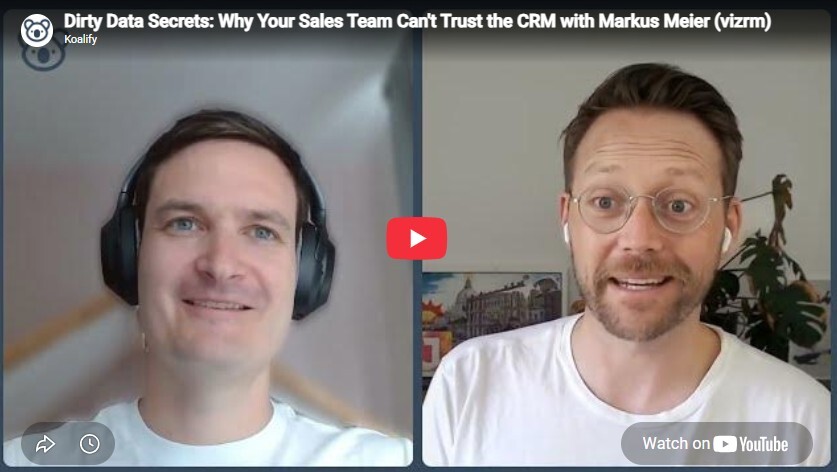
In this episode of Dirty Data Secrets, Jonas De Mets (Co-Founder of [Koalify](https://koalify.io/)) sat down with Markus Meier, a lifelong B2B sales leader and Co-Founder of [vizrm](https://www.vizrm.com/) (an account-mapping and org-chart app built natively into HubSpot), to look at dirty data from the seat where it does the most damage: the sales floor.
🎥 **Watch the full episode here:**
## The dirty data a salesperson notices first
Most conversations about CRM hygiene start with the admin or the RevOps lead. Markus started somewhere more uncomfortable: the rep who has just inherited someone else's accounts, often because territories get reshuffled every fiscal year.
> "The most annoying dirty-data moment is when you take over an existing customer from another rep. You go in and see the notes that aren't there, the contacts that have an email address and that's it, or contacts with an email address who left the company five years ago. You send an email and it just bounces."
That's the rep's version. The sales manager's version is quieter and, in its own way, worse. You're not chasing a bounce. You're looking at a forecast and trying to work out whether any of it is real.
> "I'm looking at a forecast, I'm looking at a pipeline, and I'm trying to understand: is this real?"
Markus spent part of his career reporting numbers to investors, which is where the cost of dirty data stops being abstract. When the person across the table is a VC, "the CRM has this roughly right" is not an answer. You end up grinding through emails and call notes by hand to reconstruct a picture the system should have handed you. It's the same thing every buyer we talk to describes in their own words: I can't trust the data. Whether it shows up as a bounced email or a forecast nobody believes, the root is identical.
## Reps get blamed for the mess. The system usually causes it
There's a comfortable cliché that reps are lazy about the CRM and that's why it's a mess. Markus has lived on both sides of that and doesn't buy it.
> "Reps, in many cases, are responsible for the mess in there, but it's the symptom, not the cause."
The cause is usually the way the system was set up to be filled in. He described a data-cleanliness initiative at a large company that measured exactly the wrong thing: executive dashboards tracking whether fields were populated, with a KPI attached to the count.
> "We just put two words into each of those fields. We had to fill twenty fields on each account, each deal, each record. So the data wasn't good, it was just populated. And then quickly outdated."
That's the trap. Measure completeness and you get completeness: twenty fields with two words of noise in each. What you don't get is anything a manager can forecast on. The fix isn't stricter enforcement. It's building something reps actually want to use.
> "If you build something that helps sellers be more productive and efficient, they'll use it, and they'll generate good data along the way that educates the decision-making of the leadership."
Good data is a by-product of a tool people find useful. It is almost never produced by asking a sales team to feed a database for its own sake.
## Design a process reps will actually keep clean
The same principle scales up to methodology. In B2B sales, teams reach for frameworks like MEDDIC to qualify deals, and then, as Markus points out, quietly ruin them by adding letters.
> "It can become MEDDPICC, it can become fifteen letters. Boil it down to what you actually think is useful for the reps to understand the deal."
The second failure is treating deal data as if it's fixed. On a sales cycle that runs one, two, sometimes three years, the information you captured when you created the deal is old news long before it closes.
> "The value proposition changes, the product changes, the market changes. The data I put in there when I created the deal is two years old."
His answer is a proper stage-gate process: clearly defined gates, and clearly defined criteria you confirm with the customer before a deal moves stage. Not to police reps, but to prompt them. Have you added the new stakeholders? Have you found the new business problems? Is any of this still true? A process built that way keeps data current as a side effect. A process that's just a list of stages everyone interprets differently guarantees the opposite.
## Mapping the account: who you can talk to, and who you want to
Reps don't live in reports. They live in the account, and an account is a set of people and relationships, which is exactly the thing a flat list of associated contacts is worst at showing. This is the gap vizrm fills. It turns the contacts and companies already in HubSpot into a live map you open straight from the company record.
*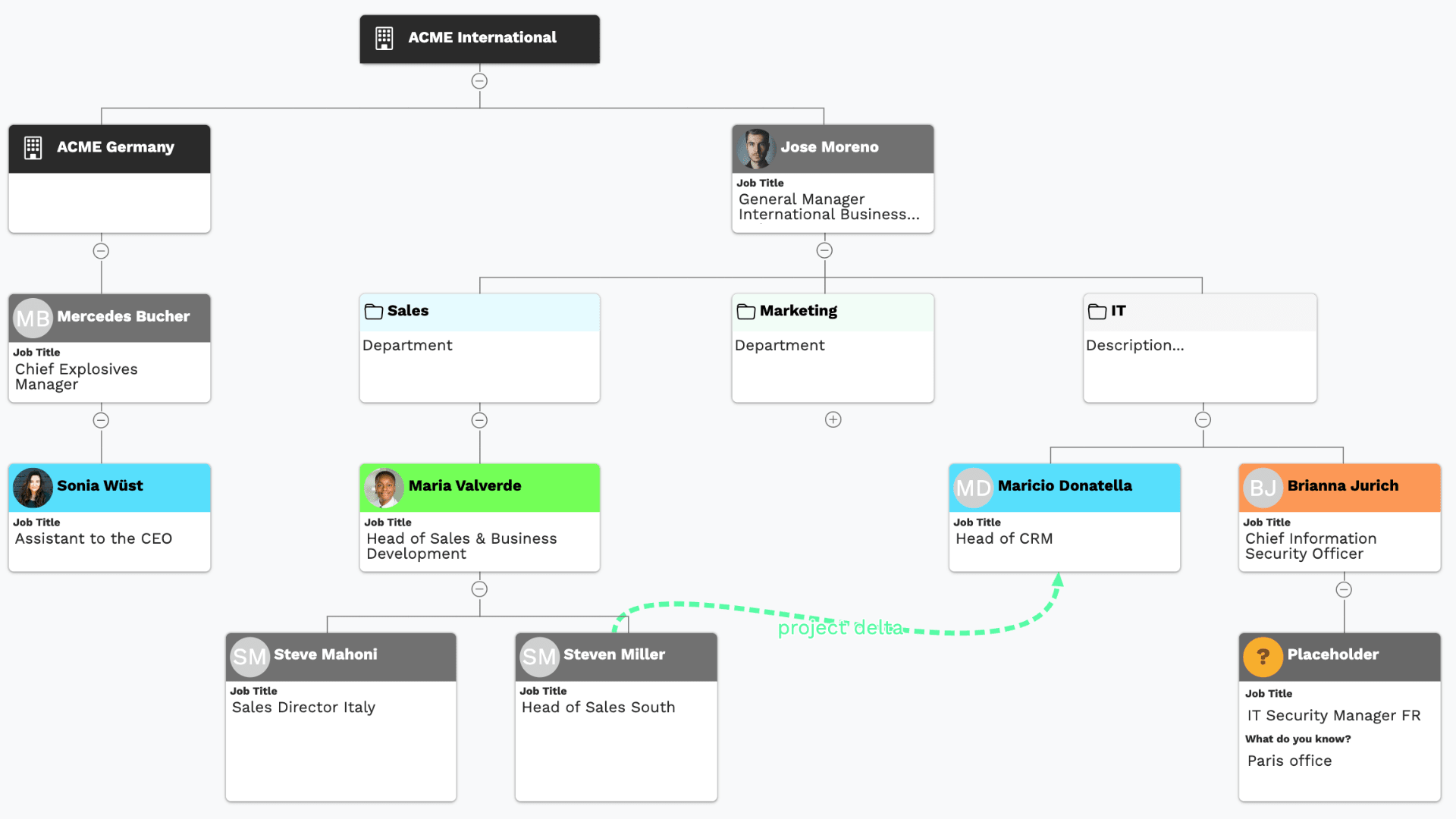*
The map isn't a static slide. It's built from your HubSpot data and edited with drag and drop, with grouping by team or department and placeholders for the stakeholders you haven't identified yet. Because it reads from HubSpot properties, you decide what shows on each card, from job title to any custom field you track.
Where it earns its place for a salesperson is engagement. vizrm layers an activity heatmap over the chart, so you can see at a glance who has actually been contacted and who has gone quiet.
*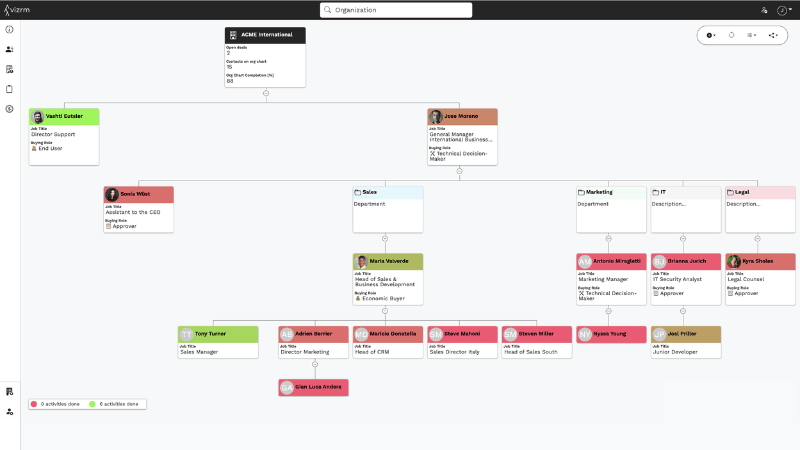*
> "I can see who are the contacts I've contacted in the last 30 or 90 days, based on my activity information from HubSpot."
That's the difference between a forecast category and a real read on a deal. A large opportunity with one engaged contact at the bottom of the chart and silence everywhere above it is single-threaded and exposed. Now you can see it, rather than find out the hard way when your only champion leaves.
The same view carries the deal stakeholders and can pull contact data in from LinkedIn, so the map becomes the single place a rep works an account from.
For Markus, all of it points at two questions.
> "For my team, the goal is to understand who are the people I can talk to, and who are the people I want to talk to."
Crucially, none of this sits in a separate silo. The relationships you draw are written back to HubSpot associations, so if you ever stop using the tool, the structure stays in your CRM. His one piece of advice on that structure is restraint.
> "The associations in HubSpot are really flexible. The best practice for me is to not over-engineer them."
## Mapping surfaces the mess reports hide
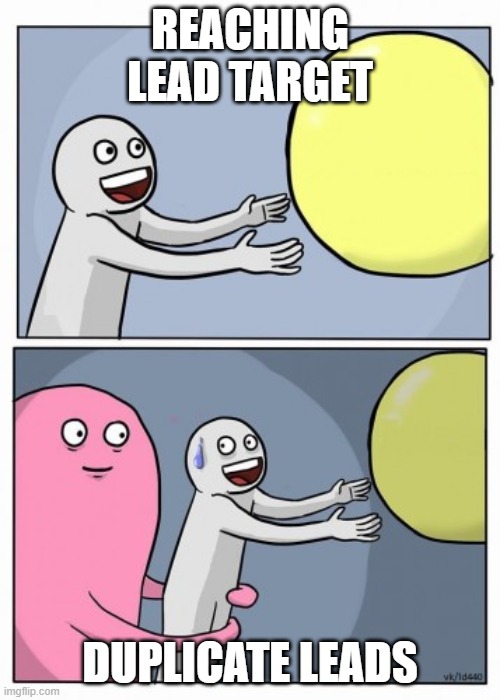
There's a catch that shows up the first time you map a real account. You go to build the chart, search the company name, and the duplicates you never noticed in aggregate reports are suddenly staring back at you.
> "The user types in ACME and we get fifty results, fifty companies. That's when people realise how dirty their data actually is."
Reports aggregate, and aggregation hides duplication. Trying to see a single account as a picture doesn't. Some of those records are genuine duplicates that should be merged into one. Some are real subsidiaries or regional offices that should stay separate and be associated instead. Sorting that out is what turns fifty confusing records into one clean account a rep can work from, and it's the job Koalify is built for: deciding at scale which records are the same company and which are related but distinct, then merging the duplicates while keeping the associations intact.
## Clean data is the foundation your sales team stands on
The throughline of the whole conversation is an order of operations. Reps can't trust a CRM full of duplicates and dead contacts. Managers can't forecast on pipeline that's spread across records. And the map that would give a rep a real read on an account only works if the records underneath it are clean.
So the sequence matters. Get the data clean first, then the account map means something, the forecast holds up, and the sales team starts trusting the CRM again, which is the only thing that makes the rest of it work.
## Frequently Asked Questions
**Why doesn't my sales team trust the CRM?**
Usually because the data doesn't survive first contact. Reps who inherit accounts find bounced emails, stale contacts, and duplicate records for the same company, and each bad experience teaches them to check somewhere else before trusting HubSpot. Duplicate company and deal records are a common root cause. When one account is spread across many records, no single view shows the true state of the relationship, so the numbers stop feeling real.
**How do duplicate records affect sales forecasting?**
Badly, and quietly. When the same account or deal exists as several records, pipeline value is split across them, so no report shows the real number. Managers end up reconstructing the picture by hand from emails and notes, and reps lose confidence in what the CRM tells them. Removing duplicates restores a single, trustworthy view of each account and its associated deals, which is the precondition for any forecast a team will actually believe.
[**Should I merge or associate duplicate companies in HubSpot?**](https://koalify.io/blog/when-to-merge-vs-associate-companies-in-hubspot)
Merge records that represent the same entity, meaning the same company entered multiple times. Associate records that represent genuinely different but related entities, such as a parent company and its subsidiaries or regional offices. The safe approach is to define clear matching rules so true duplicates are merged, while distinct entities stay separate and get linked with parent-child associations. Merging a real subsidiary into its parent destroys a distinction your reporting and finance teams often need.
**How do I give my reps a clean view of an account before it costs a deal?**
Start with a gut check: search a well-known account name in HubSpot. If one company returns dozens of records, you have a portal-wide problem, not a one-off. From there, set matching rules to identify duplicates across your records, merge them in bulk rather than one at a time, and turn on ongoing detection so new duplicates from integrations and imports get caught automatically. Do it before the next territory handover, so the rep inheriting those accounts opens one clean record instead of fifteen fragments.
###### Category
- [HubSpot Data Quality](https://koalify.io/blog/tag/hubspot-data-quality)
- [HubSpot Email Validation](https://koalify.io/blog/tag/hubspot-email-validation)
- [HubSpot Revenue Operations](https://koalify.io/blog/tag/hubspot-revenue-operations)
- [HubSpot Integration Duplicates](https://koalify.io/blog/tag/hubspot-integration-duplicates)
- [HubSpot Associations](https://koalify.io/blog/tag/hubspot-associations)
- [HubSpot Deduplication](https://koalify.io/blog/tag/hubspot-deduplication)
###### Popular Post
- [HubSpot best practices for contacts that leave a company](https://koalify.io/blog/hubspot-best-practices-for-contacts-that-leave-a-company)
- [How to Bulk Merge HubSpot Duplicates: Contacts, Companies, Deals and More](https://koalify.io/blog/how-to-bulk-merge-hubspot-duplicates-contacts-companies-more)
- [How to Merge Companies in HubSpot (Safely, Manually or in Bulk)](https://koalify.io/blog/how-to-merge-companies-in-hubspot-manual-or-in-bulk)
- [HubSpot Deduplication: How to Find, Manage, and Remove Duplicates in HubSpot](https://koalify.io/blog/hubspot-deduplication-the-ultimate-guide-to-zero-duplicates-in-hubspot)
- [How to Merge Duplicate Contacts in HubSpot Without Losing Data](https://koalify.io/blog/how-to-merge-contacts-in-hubspot-manual-or-in-bulk)
### Similar Blogs

#### [Dirty Data Secrets: Your HubSpot Workflows Are a Black Box (with Christian Baun)](https://koalify.io/blog/dirty-data-secrets-your-hubspot-workflows-are-a-black-box-with-christian-baun)
By [Jonas](https://koalify.io/blog/author/jonas) 23 June 2026
Most HubSpot portals have more automation than anyone fully understands. Workflows get created by...
[READ MORE](https://koalify.io/blog/dirty-data-secrets-your-hubspot-workflows-are-a-black-box-with-christian-baun)

#### [How to Manage HubSpot Duplicates with the Salesforce Integration (Without Breaking the Sync)](https://koalify.io/blog/how-to-manage-duplicate-contacts-and-companies-with-the-hubspot-salesforce-integration)
By [Jonas](https://koalify.io/blog/author/jonas) 28 November 2024
When you run HubSpot and Salesforce side by side, duplicates cause problems for marketing, sales...
[READ MORE](https://koalify.io/blog/how-to-manage-duplicate-contacts-and-companies-with-the-hubspot-salesforce-integration)
#### [Deduplicate first, then enrol the clean contact in a HubSpot sequence](https://koalify.io/blog/deduplicate-first-then-enrol-the-clean-contact-in-a-hubspot-sequence)
By [Jonas](https://koalify.io/blog/author/jonas) 23 July 2026
If you automate outreach in HubSpot, duplicate contacts break the process quietly.
[READ MORE](https://koalify.io/blog/deduplicate-first-then-enrol-the-clean-contact-in-a-hubspot-sequence)
## Koalify
HubSpot deduplication & email validation
-
-
[Review Koalify in the HubSpot Marketplace](https://app-eu1.hubspot.com/l/marketplace/listing/koalify-io/write-review?eco_review_source=external-button)
[](https://trust.koalify.io/)
[](https://trust.koalify.io/)
## Deduplication
[Deduplication for HubSpot](https://koalify.io)
[Pricing](https://koalify.io/pricing)
[Knowledge Base](https://koalify.io/knowledge-base)
[Terms of Service](https://koalify.io/terms-of-service)
[Data Processing Addendum](https://koalify.io/data-processing-addendum)
[HubSpot Deduplication Tools](https://koalify.io/best-hubspot-deduplication-apps)
[vs. HubSpot Native](https://koalify.io/compare/koalify-vs-hubspot-native-deduplication)
[vs. Insycle](https://koalify.io/compare/koalify-vs-insycle-hubspot-deduplication)
[vs. Dedupely](https://koalify.io/compare/koalify-vs-dedupely)
[HubSpot Deduplication Guide](https://koalify.io/blog/hubspot-deduplication-the-ultimate-guide-to-zero-duplicates-in-hubspot)
[Merge HubSpot Contacts](https://koalify.io/blog/how-to-merge-contacts-in-hubspot-manual-or-in-bulk)
[Merge HubSpot Companies](https://koalify.io/blog/how-to-merge-companies-in-hubspot-manual-or-in-bulk)
[Merge HubSpot Deals](https://koalify.io/blog/how-to-merge-deals-in-hubspot-manual-or-in-bulk)
[Bulk Merge HubSpot](https://koalify.io/blog/how-to-bulk-merge-hubspot-duplicates-contacts-companies-more)
## Email Validation
[Email Validation for HubSpot](https://koalify.io/hubspot-email-validation)
[Pricing](https://koalify.io/hubspot-email-validation-pricing-koalify)
[Knowledge Base](https://koalify.io/email-validation-knowledge-base)
[Terms of Service](https://koalify.io/terms-of-service-email-validation)
[Data Processing Addendum](https://koalify.io/data-processing-addendum-email-validation)
[HubSpot Email Validation Tools](https://koalify.io/best-email-validation-tools-for-hubspot)
[vs. NeverBounce](https://koalify.io/compare/koalify-vs-neverbounce)
[vs. ZeroBounce](https://koalify.io/compare/koalify-vs-zerobounce)
[vs. Kickbox](https://koalify.io/compare/koalify-vs-kickbox)
[HubSpot Email Validation Guide](https://koalify.io/hubspot-email-validation-guide)
[HubSpot Email Deliverability](https://koalify.io/hubspot-email-deliverability)
[HubSpot Bounce Rate](https://koalify.io/hubspot-bounce-rate)
## Company
[Partners](https://koalify.io/partners)
[Blog](https://koalify.io/blog)
[Trust Center](https://trust.koalify.io/)
[Security](https://koalify.io/security)
© 2026 Koalify. All rights reserved.
```json
{
"@context" : "https://schema.org",
"@type" : "BlogPosting",
"author" : {
"@type" : "Person",
"name" : "Jonas",
"url" : "https://koalify.io/blog/author/jonas"
},
"dateModified" : "2026-08-12T09:24:55.186Z",
"datePublished" : "2026-08-12T09:24:55.000Z",
"headline" : "Dirty Data Secrets: Your Sales Team Can't Trust the CRM (with Markus from vizrm)",
"image" : [ "https://koalify.io/hubfs/Dirty%20Data%20Secrets%20Your%20Sales%20Team%20Cant%20Trust%20the%20CRM%20with%20Markus%20from%20vizrm.jpg" ],
"mainEntityOfPage" : {
"@id" : "https://koalify.io/blog/dirty-data-secrets-your-sales-team-cant-trust-the-crm-with-markus-from-vizrm",
"@type" : "WebPage"
},
"publisher" : {
"@type" : "Organization",
"logo" : {
"@type" : "ImageObject",
"url" : "https://koalify.io/hubfs/koalify_rectangle_100px.png"
},
"name" : "Koalify"
}
}
```