


Dedupely vs. Koalify: The 2026 Comparison Guide
Duplicate records are one of the fastest ways for a HubSpot portal to lose reliability. What starts as a few duplicated contacts can quickly lead to broken workflows, inaccurate reporting, and teams working on conflicting data.
Both Koalify and Dedupely aim to solve duplicate data in HubSpot, but they take very different approaches in where deduplication happens, how merges are automated, and how much control teams have over merge outcomes.
This guide compares Koalify vs Dedupely across detection logic, automation, merge behavior, recovering from a bad merge, and operational fit.
Last updated: October 2026 (reviewed quarterly)
What’s the difference between Koalify and Dedupely?
-
Koalify is a HubSpot-native deduplication app designed for automated, workflow-based deduplication with full control over merge behavior.
-
Dedupely is an external deduplication tool focused on basic duplicate detection and merging outside of HubSpot.
The 10-Second Verdict
-
Choose Koalify if: You want deduplication to live inside HubSpot, run automatically via workflows, and need SOC 2 Type II, EU/UK data residency, or a way to undo merges, one record or hundreds, if a rule gets it wrong.
-
Choose Dedupely if: You prefer a standalone interface for cleanup and don’t require native HubSpot workflow automation, control over which record becomes primary, or a way to undo merges.
| Feature | Koalify | Dedupely |
|---|---|---|
|
Primary focus |
Advanced HubSpot-native deduplication | Dedicated deduplication |
|
Ease of use |
⭐⭐⭐⭐ |
⭐⭐⭐⭐ |
|
Pricing |
💲 💲 |
💲 💲 💲 💲 |
| 1. SECURITY & COMPLIANCE | ||
|
SOC 2 Type II |
✅ Yes |
❌ No |
|
ISO 27001 |
✅ Yes |
✅ Yes |
|
GDPR |
✅ Yes |
✅ Yes |
|
EU/UK data residency |
✅ Yes |
❌ No |
| 2. HUBSPOT INTEGRATION | ||
|
Review duplicates in HubSpot |
✅ Yes |
❌ No |
|
Manual merge in HubSpot |
✅ Yes |
❌ No |
|
Bulk merge workflows |
✅ Yes |
❌ No |
|
3. OBJECT COVERAGE |
||
|
Merge contacts & companies |
✅ Yes |
✅ Yes |
|
Merge deals |
✅ Yes |
✅ Yes |
|
Merge tickets |
✅ Yes |
✅ Yes |
|
Merge custom objects |
✅ Yes |
✅ Yes |
|
Merge leads |
✅ Yes |
✅ Yes |
|
Merge companies with Salesforce integration |
✅ Yes |
✅ Yes |
| 4. MATCHING LOGIC | ||
|
Flexible matching rules |
✅ Yes |
✅ Yes |
|
Fuzzy & similar matching |
✅ Yes |
✅ Yes |
|
5. MERGE BEHAVIOR |
||
|
Flexible primary rules |
✅ Yes |
❌ No |
|
Property retention rules |
✅ Yes |
✅ Yes |
|
6. MERGE RECOVERY |
||
|
Unmerge a single record |
✅ Yes |
❌ No |
|
Bulk unmerge |
✅ Yes (via workflow) |
❌ No |
General characteristics
This section provides a high-level summary of Koalify and Dedupely. Detailed explanations for each criterion follow later in the guide.
Primary focus
Koalify focuses on HubSpot-native, automated deduplication. It is designed to run entirely inside HubSpot using standard objects, properties, lists, CRM cards, and workflows, with an emphasis on continuous deduplication and controlled merge behavior at scale.
Dedupely focuses on basic duplicate detection and cleanup. It operates as an external tool connected to HubSpot and is primarily designed for batch-based duplicate identification and merging.
Ease of use
Koalify is built for RevOps, Sales Ops, and Marketing Ops teams who work directly inside HubSpot. All setup, review, and automation happens using familiar HubSpot tools, which keeps onboarding and day-to-day operation straightforward.
Dedupely is relatively easy to get started with for one-off or periodic cleanup tasks, but requires users to leave HubSpot to review and execute merges in an external interface.
Bottom line:
Koalify is easier to operate as part of daily HubSpot workflows. Dedupely is simpler for occasional cleanup but less integrated into day-to-day CRM operations.
Pricing model
Koalify
-
Pricing is based on the number of records for the specific objects you choose to deduplicate
-
$5 per 10,000 records per month (billed annually)
-
$10 per 10,000 records per month (billed monthly)
-
Pricing is capped at $500/month for portals with over 1M records (billed annually)
Dedupely
-
Pricing is tier-based and tied to the number of records in the selected objects
-
~$9 per 10,000 records per month (billed annually)
-
~$11.70 per 10,000 records per month (billed monthly)
-
Tier-based pricing can result in higher effective costs when record counts exceed a threshold
Bottom line:
On annual plans, Koalify is typically about half the price of Dedupely, especially for larger portals. You also only pay for the objects you actually want to deduplicate.
Pricing figures are indicative and based on publicly available information. Actual pricing may vary by contract, region, and feature set.

1. Security & Compliance
Dedupely
-
ISO 27001 certified
-
GDPR compliant
-
No SOC 2 Type II certification
-
No EU/UK data residency options
Koalify
-
SOC 2 Type II compliant
-
ISO 27001 certified
-
GDPR compliant
-
Supports EU/UK data residency
Bottom line:
If you require SOC 2 Type II or European data residency, Koalify is the only option between the two.
2. HubSpot Integration Model
Where your data is processed matters for speed and team adoption.
Dedupely
-
Operates outside of HubSpot
-
Requires users to leave HubSpot to review and merge duplicates
-
Merges are executed externally and then synced back
Koalify
-
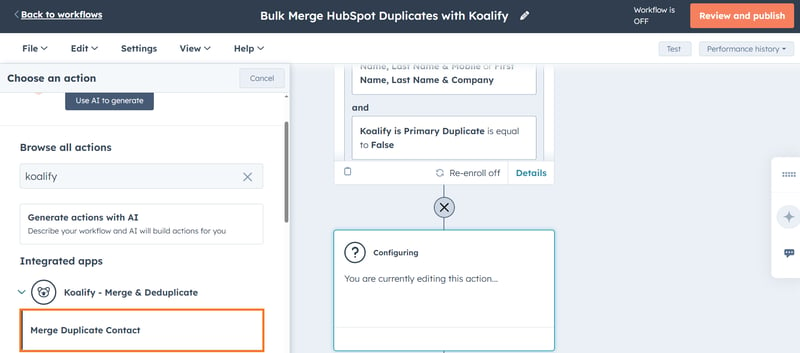
Runs entirely inside HubSpot
-
Uses HubSpot properties, lists, CRM cards, and workflows
-
Records are merged directly in your HubSpot portal via CRM cards or workflow actions.
Bottom line:
Koalify behaves like a native HubSpot tool. Dedupely behaves like an external cleanup tool.
3. Object Coverage
Dedupely
-
Supports contacts, companies, deals, tickets, leads, and custom objects
-
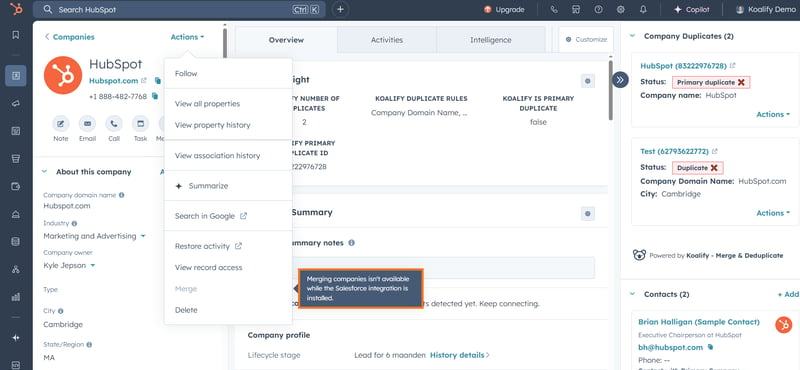
Supports merging companies when the Salesforce integration is enabled
Koalify
-
Supports contacts, companies, deals, tickets, leads, and custom objects
-
Supports merging companies when the Salesforce integration is enabled
Bottom line:
Both tools cover the core HubSpot objects, including company merges with the Salesforce integration enabled. Object coverage isn’t the deciding factor between the two. Where they differ is where the work happens and how much control you have over the merge.
4. Control Over Matching Logic
Dedupely
-
Dedupely supports flexible and fuzzy matching
-
Primarily optimized for batch cleanup
Koalify
-
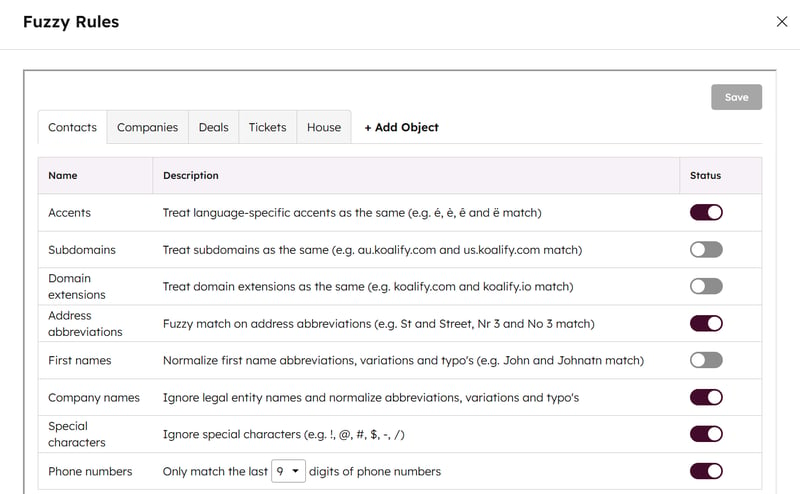
Koalify supports flexible and fuzzy matching
-
Allows fuzzy rules to run continuously inside HubSpot
Bottom line:
Both tools capture most duplicates via fuzzy matching logic.
5. Control Over Merge Behavior
Dedupely
-
Limited control over which record becomes primary
Koalify
-
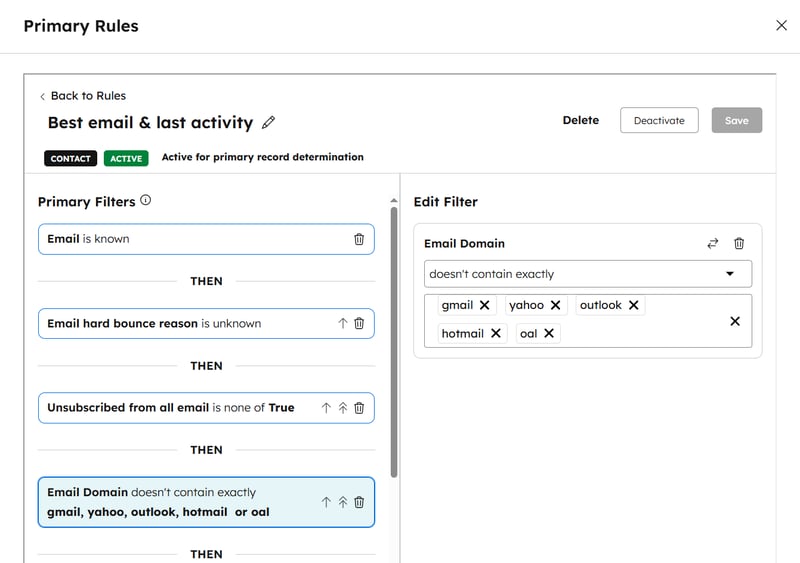
Primary record rules using waterfall logic (IDs, email presence, lifecycle stage, etc.)
Bottom line:
If you need control over which record becomes primary, Koalify is the only option of the two.
6. Recovering From a Bad Merge
Batch cleanups are where bad merges happen: a rule that matches on company name alone, or a run across 50,000 records that behaved differently from the test on 50. What matters is how you get back.
Dedupely
-
No documented unmerge
-
Once records are merged and synced back, recovery means rebuilding each record by hand from HubSpot property history
Koalify
-
Stores a snapshot of both records at the moment of every merge, logged as a Koalify Merge record inside HubSpot
-
Unmerge a single record from its timeline
-
Bulk unmerge through a workflow by filtering bad merges by workflow, rule or date
-
Limits: works only on merges Koalify made, covers contacts and companies, and restored records get a new record ID
Bottom line:
If you want a way back from a bad merge, Koalify is the only option of the two. See how to undo a merge in HubSpot for the full walkthrough.
When Dedupely is a good fit
Dedupely can be a reasonable choice if:
-
You want a simple external tool for duplicate cleanup
-
You don’t need to control which record becomes primary
-
SOC 2 Type II or EU/UK data residency is not a requirement
-
You don’t need a way to undo merges after a cleanup

When Koalify is a good fit
Koalify is a better fit when:
-
Deduplication needs to run continuously in HubSpot, not occasionally
-
You want to review and merge duplicates without leaving HubSpot
-
You want to control which record is the master record when merging
-
You want to automate merging with a way back if a rule is too loose
-
Your legal or procurement team requires SOC 2 Type II or EU/UK data residency, which is common in financial services, healthcare and legal
👉 For a broader market overview and comparisons across all major tools, see our full guide to the Best Deduplication Apps for HubSpot.