---
title: How to Create an Exclusion List for Invalid Emails in HubSpot
description: Build an active segment of Koalify-flagged invalid emails and use it to exclude bad addresses from every HubSpot send. Protect your bounce rate.
---
[Skip to content](https://koalify.io/email-validation-knowledge-base/how-to-create-an-exclusion-list-for-invalid-emails-in-hubspot#main-content)

Open main navigation
Close main navigation
- [GET STARTED FREE](https://api.email.koalify.io/hubspot/install?utm_source=koalify&utm_medium=knowledgebase&utm_campaign=navigation)
[GET STARTED FREE](https://api.email.koalify.io/hubspot/install?utm_source=koalify&utm_medium=knowledgebase&utm_campaign=navigation)
Search the Email Validation Knowledge Base 🐨
- There are no suggestions because the search field is empty.
1. [Koalify Email Validation Knowledge Base](https://koalify.io/email-validation-knowledge-base?hsLang=en)
2. [Validation activation](https://koalify.io/email-validation-knowledge-base/validation-activation?hsLang=en)
# How to Create an Exclusion List for Invalid Emails in HubSpot
## Build an active list of contacts Koalify has flagged as invalid, then add it as an exclusion list on your marketing emails so you never send to a bad address again.
These workflows use [custom properties that are created automatically by the Koalify – Email Validation app](https://koalify.io/email-validation-knowledge-base/koalify-email-validation-custom-properties-in-hubspot?hsLang=en).
### 1. Create a new Segment
- In HubSpot, go to **CRM \> Segments (Lists)**
- Click **Create Segment**
- Select **Contact-based**
- Give it a clear name, e.g. **Koalify Invalid Emails**
### 2. Set the list criteria
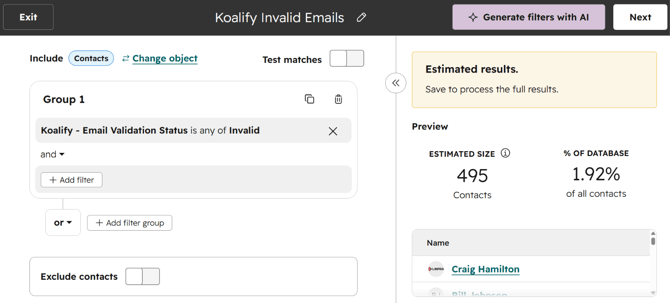
- Add the filter:
- Contact property → **Koalify – Email Validation Status** is **Invalid**
- Click **Next**
- **Save and process** as an **Active Segment**
- With Koalify you can update the validation status automatically via [workflows](https://koalify.io/email-validation-knowledge-base/how-to-automatically-validate-hubspot-contact-emails-using-the-koalify-workflow-action?hsLang=en)or [CRM cards](https://koalify.io/email-validation-knowledge-base/how-to-validate-a-contacts-email-in-hubspot-using-the-koalify-email-validation-card?hsLang=en), so keeping the segment active keeps it current.
### 3. Use the segment as an exclusion on your emails
- Open or create a marketing email and go to the **Recipients** step
- Under **Don't send to**, add your **Koalify Invalid Emails** segment
- Because the segment is active, it updates before each send, so there's no manual maintenance needed
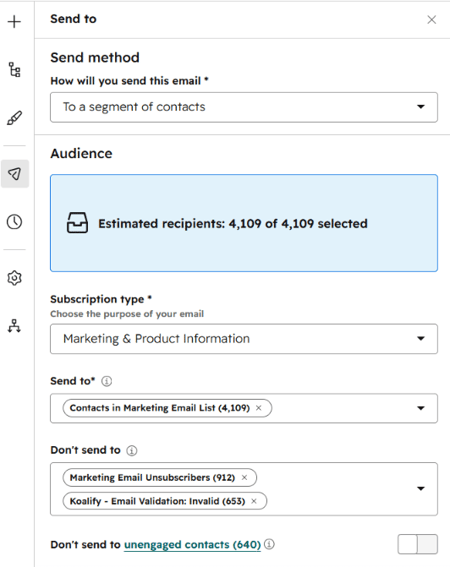
Any contact on the list is now excluded from that send, protecting your bounce rate and sender reputation.
- [Getting started](https://koalify.io/email-validation-knowledge-base/getting-started?hsLang=en)
- [Validation card](https://koalify.io/email-validation-knowledge-base/validation-card?hsLang=en)
- [Workflow validation](https://koalify.io/email-validation-knowledge-base/workflow-validation?hsLang=en)
- [Validation insights](https://koalify.io/email-validation-knowledge-base/validation-insights?hsLang=en)
- [Validation activation](https://koalify.io/email-validation-knowledge-base/validation-activation?hsLang=en)
- [Account & billing](https://koalify.io/email-validation-knowledge-base/account-billing?hsLang=en)
[](https://koalify.io/?hsLang=en)
HubSpot deduplication and email validation
Copyright © 2026, Koalify