---
title: How to Set Invalid Contacts as Non-Marketing in HubSpot
description: Use a Koalify workflow to set invalid contacts as non-marketing in HubSpot automatically, so bad email addresses stop inflating your bill.
---
[Skip to content](https://koalify.io/email-validation-knowledge-base/how-to-set-invalid-contacts-as-non-marketing-in-hubspot#main-content)

Open main navigation
Close main navigation
- [GET STARTED FREE](https://api.email.koalify.io/hubspot/install?utm_source=koalify&utm_medium=knowledgebase&utm_campaign=navigation)
[GET STARTED FREE](https://api.email.koalify.io/hubspot/install?utm_source=koalify&utm_medium=knowledgebase&utm_campaign=navigation)
Search the Email Validation Knowledge Base 🐨
- There are no suggestions because the search field is empty.
1. [Koalify Email Validation Knowledge Base](https://koalify.io/email-validation-knowledge-base?hsLang=en)
2. [Validation activation](https://koalify.io/email-validation-knowledge-base/validation-activation?hsLang=en)
# How to Set Invalid Contacts as Non-Marketing in HubSpot
## Use a workflow to automatically mark any contact Koalify flags as invalid as a non-marketing contact, so bad email addresses stop counting towards your Marketing Contacts bill.
These workflows use [custom properties that are created automatically by the Koalify – Email Validation app](https://koalify.io/email-validation-knowledge-base/koalify-email-validation-custom-properties-in-hubspot?hsLang=en).
### 1. Create a new workflow
- In HubSpot, go to **Automations \> Workflows**
- Click **Create workflow from scratch**
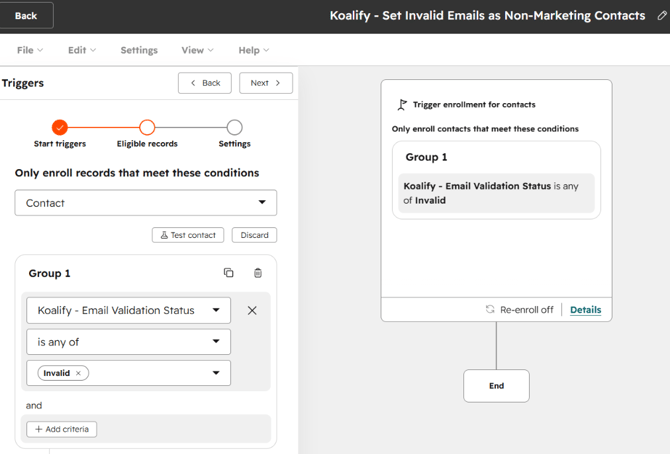
### 2. Set enrollment criteria
- Select **Met filter criteria** as the enrollment trigger
- Add the filter:
- Contact property → **Koalify – Email Validation Status** is any of **Invalid**
- Turn on **re-enrolment** so contacts are enrolled whenever their status changes to invalid
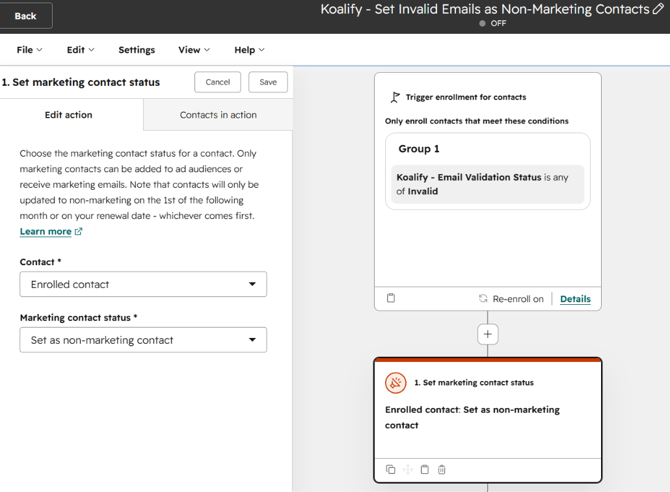
### 3. Add the set as non-marketing action
- Click the **+** to add an action
- Under **Marketing**, select **Set marketing contact status**
- Set the status to **Non-marketing contact**
- Save and turn the workflow on
Any contact Koalify flags as invalid is now set to non-marketing automatically. The change takes effect at the start of your next billing period, so invalid addresses stop inflating your marketing contact count going forward.
- [Getting started](https://koalify.io/email-validation-knowledge-base/getting-started?hsLang=en)
- [Validation card](https://koalify.io/email-validation-knowledge-base/validation-card?hsLang=en)
- [Workflow validation](https://koalify.io/email-validation-knowledge-base/workflow-validation?hsLang=en)
- [Validation insights](https://koalify.io/email-validation-knowledge-base/validation-insights?hsLang=en)
- [Validation activation](https://koalify.io/email-validation-knowledge-base/validation-activation?hsLang=en)
- [Account & billing](https://koalify.io/email-validation-knowledge-base/account-billing?hsLang=en)
[](https://koalify.io/?hsLang=en)
HubSpot deduplication and email validation
Copyright © 2026, Koalify