---
title: How to merge HubSpot duplicates using the Koalify Duplicate Cards
description: Koalify Duplicate Cards give customer-facing teams instant duplicate suggestions they can quickly review and merge.
---
[Skip to content](https://koalify.io/knowledge-base/how-to-merge-hubspot-duplicates-using-the-koalify-duplicate-cards#main-content)
![koalify\_rectangle\_-3.png\]](https://koalify.io/hs-fs/hubfs/koalify_rectangle_-3.png?width=50&height=50&name=koalify_rectangle_-3.png)
Open main navigation
Close main navigation
- [GET STARTED FREE](https://api.koalify.io/hubspot/install?utm_source=koalify&utm_medium=knowledgebase&utm_campaign=navigation)
[GET STARTED FREE](https://api.koalify.io/hubspot/install?utm_source=koalify&utm_medium=knowledgebase&utm_campaign=navigation)
Search the Deduplication Knowledge Base 🐨
- There are no suggestions because the search field is empty.
1. [Koalify Knowledge Base](https://koalify.io/knowledge-base?hsLang=en)
2. [Duplicate cards](https://koalify.io/knowledge-base/duplicate-cards?hsLang=en)
# How to merge HubSpot duplicates using the Koalify Duplicate Cards
## Koalify Duplicate Cards let you spot, reject, and merge duplicate records directly on HubSpot record pages
### Before you begin
Make sure the [Koalify Duplicate Cards are enabled and visible](https://koalify.io/knowledge-base/how-to-enable-the-koalify-duplicate-cards-in-right-hand-sidebar-of-hubspot?hsLang=en) in the right-hand sidebar of your records.
### When a Duplicate Is Detected
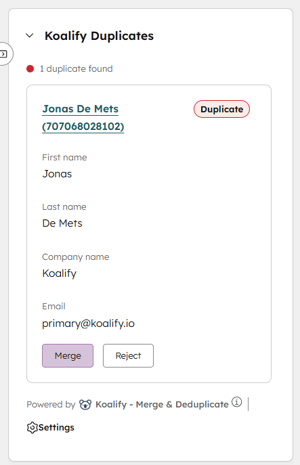
As soon as Koalify identifies a duplicate, it will appear in the **Koalify Duplicate Card** on the right-hand sidebar of the record you’re viewing.
From there, you have two options:
- **Merge** the duplicate
- **Reject** the duplicate
### Option 1: Merge a Duplicate
You can merge a record directly from the duplicate card with just a single **click on Merge**.
**What happens next?**
- The record you are currently viewing becomes the **primary record**.
- The **suggested duplicate is merged** into this primary record.
- A **new merged record is created**.
- The merge activity is **logged in the record timeline** for full visibility.
### Option 2: Reject a Duplicate
If the suggested record is not actually a duplicate, you can reject it with a single **click on Reject**.
**What happens next?**
- The **two records will no longer be flagged** as duplicates.
- The rejected duplicate will appear in your **rejected duplicates overview**.
- If needed, you can **undo the rejection**, and the duplicate suggestion will appear again.
### Summary
With Koalify Duplicate Cards, you can:
- Instantly spot duplicates
- Merge records directly from the sidebar with a single click
- Reject incorrect duplicate suggestions
- Undo rejected duplicates if needed
All without leaving the record page.
- [Getting Started](https://koalify.io/knowledge-base/getting-started?hsLang=en)
- [Koalify settings](https://koalify.io/knowledge-base/koalify-settings?hsLang=en)
- [Duplicate overview](https://koalify.io/knowledge-base/duplicate-overview?hsLang=en)
- [Duplicate cards](https://koalify.io/knowledge-base/duplicate-cards?hsLang=en)
- [Bulk merging](https://koalify.io/knowledge-base/bulk-merging?hsLang=en)
- [Merges overview](https://koalify.io/knowledge-base/merges-overview?hsLang=en)
- [Unmerging](https://koalify.io/knowledge-base/unmerging?hsLang=en)
- [Account & Billing](https://koalify.io/knowledge-base/account-billing?hsLang=en)
[](https://koalify.io/?hsLang=en)
HubSpot deduplication and email validation
Copyright © 2026, Koalify
```json
{
"@context" : "https://schema.org",
"@type" : "VideoObject",
"caption" : {
"@type" : "MediaObject",
"contentUrl" : "https://koalify.io/media-transcripts/366551400674/en.vtt",
"inLanguage" : "en",
"name" : "en Captions"
},
"contentUrl" : "https://143469351.fs1.hubspotusercontent-eu1.net/hubfs/143469351/video_assets/366551400674/inherited/web_optimized.mp4",
"dateModified" : "2026-03-02T13:32:18.411Z",
"duration" : "PT53.986S",
"height" : 2160,
"name" : "How to merge HubSpot duplicates using the new Koalify Duplicate Cards",
"thumbnailUrl" : "https://koalify.io/hubfs/How%20to%20merge%20HubSpot%20duplicates%20using%20the%20new%20Koalify%20Duplicate%20Cards.mp4/medium.jpg",
"uploadDate" : "2026-02-20T13:59:03.411Z",
"width" : 3840
}
```