![koalify_rectangle_-3.png]](https://koalify.io/hs-fs/hubfs/koalify_rectangle_-3.png?width=50&height=50&name=koalify_rectangle_-3.png)
These workflows use custom properties that are created automatically by the Koalify – Email Validation app.
1. Create a New Workflow
- In HubSpot, go to Automations > Workflows
- Click Create workflow from scratch
2. Set Enrollment Criteria
- Select Met Filter Criteria as the enrollment trigger
- Choose Contact (email validation runs on the contact object)
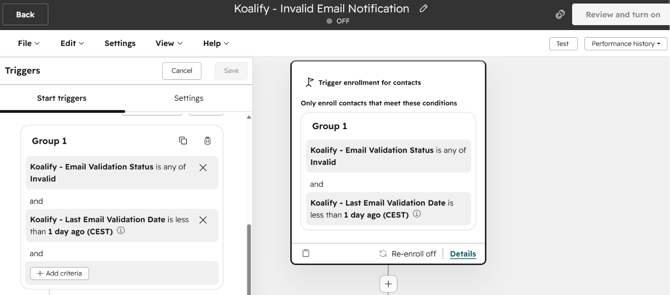
- Add the filters:
- Contact property → Koalify – Email Validation Status is Invalid
- AND
- Contact property → Koalify – Last Email Validation Date is less than 1 day ago
- Contact property → Koalify – Email Validation Status is Invalid
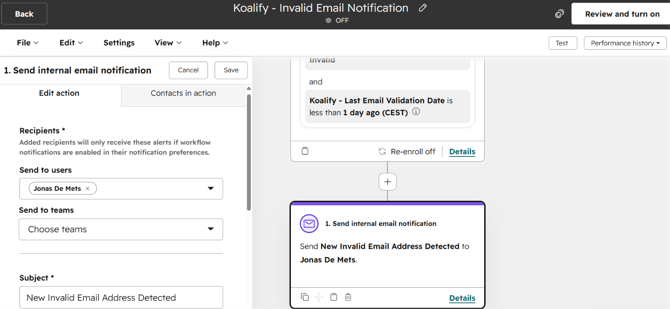
3. Add a Notification Action
Choose how you want to alert users when an invalid email appears:
- Add an Action to the workflow.
- Under Communications, select one of the following:
- Send internal email notification
- Send in-app notification
- Send Slack notification