![koalify_rectangle_-3.png]](https://koalify.io/hs-fs/hubfs/koalify_rectangle_-3.png?width=50&height=50&name=koalify_rectangle_-3.png)
By default, HubSpot’s native merge process creates a new primary record when records are merged. While this behavior works well for most use cases, but it can create problems when integrations depend on existing HubSpot record IDs or when merge history limits are reached.
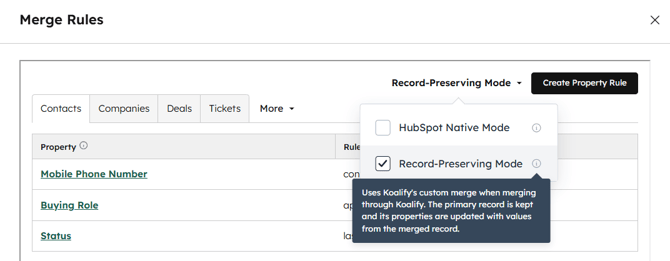
Koalify offers an alternative merge mode called Record-Preserving Merge. You may also see this referred to as a Hybrid Merge or Synthetic Merge. This mode is designed to closely replicate the outcome of a native HubSpot merge while avoiding some of its platform limitations.
What happens during a Record-Preserving Merge?
During a Record-Preserving Merge:
-
The secondary record is deleted
-
The existing primary record is updated with combined data
-
No new record is created
Important data such as property values, activities, and associations is preserved and consolidated on the existing primary company record.
Why use a Record-Preserving in HubSpot?
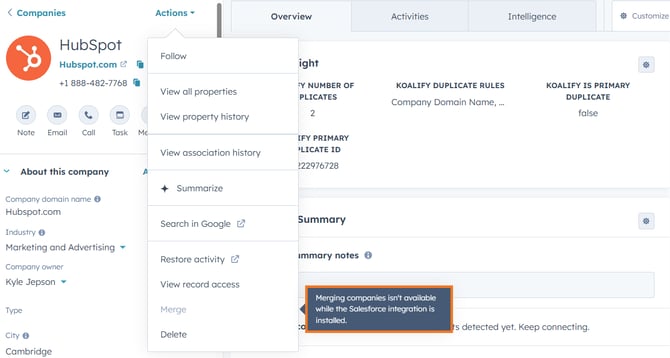
1) Salesforce integration
Historically, HubSpot has not supported company merges when the Salesforce integration is active, including through the API.
A Record-Preserving Merge provides an alternative way to consolidate records without relying on HubSpot’s native merge process.
2) Preserve HubSpot Record IDs
HubSpot’s native merge creates a new record, which means the merged record gets a new HubSpot record ID. That can cause issues for integrations, sync logic, or internal processes that rely on stable HubSpot record IDs. A Record-Preserving Merge keeps the existing primary record in place, so its record ID does not change.
3. Avoid HubSpot’s merge ID storage limit
HubSpot stores merged record IDs on the primary record but limits this to 250 stored merge IDs. In portals with high deduplication volume, this limit can be reached.
A Record-Preserving Merge avoids this limitation because no new merged record is created and no merge ID history needs to be stored in the same way.
How Koalify’s Record-Preserving Merge works
Koalify’s Record-Preserving Merge is designed to behave similarly to HubSpot’s native merge, with a few important differences.
General behavior
- No new record record is created
- The secondary record is deleted
- The primary record is updated with selected data from the secondary record
Standard properties
- The secondary record’s
emailandhs_additional_emailsvalues are appended to the primary record’shs_additional_emails - The secondary record’s
domainandhs_additional_domainsvalues are appended to the primary record’shs_additional_domains - Lifecycle stage is advanced to the furthest stage reached across the two records for contacts and companies
- If the primary record already has a value → it remains unchanged
- If the primary record is empty and the secondary has a value → the secondary value is used
Read-only properties
Properties that cannot be written via the API are not updated, including:
-
Analytics properties
-
Calculated fields
-
System-generated properties
Activities (calls, emails, tasks, meetings)
-
All activities from both records are combined under the primary company
Associations (contacts, companies, deals, tickets, etc.)
-
Associations are merged unless this would exceed HubSpot’s association limits
-
If the limit is exceeded, the merge won’t succeed, you’ll need to reduce associations first
Associated leads
-
Due to HubSpot API limitations, only leads linked to the primary contact/company are retained
-
Leads associated with the secondary contact/company will not be preserved
Segments
- Only the primary records' static segment memberships are retained on the surviving record.
- Active segment memberships are re-evaluated based on the merged record's current properties. If the merged record meets the segment criteria, it stays. If not, it falls out.
Workflows
-
The primary company may be enrolled if updated data matches workflow criteria
-
The secondary company is automatically unenrolled when it is deleted
Merging is irreversible, so we recommend testing a couple Record-Preserving merges manually with our duplicate cards feature before bulk merging via the Koalify workflow action.