
Before you get started
The Validate Email Address action is available on all HubSpot plans that support workflows. When you install Koalify, a starter validation workflow is created in your portal automatically. You can use that as a base or build from scratch using the steps below.
1. Create a new workflow
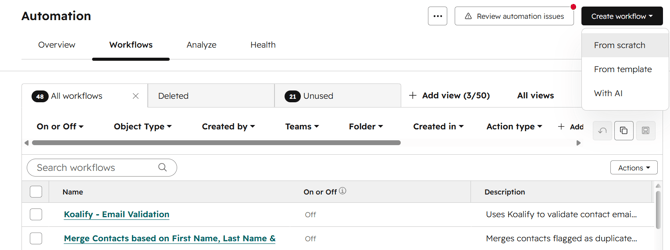
- In your HubSpot account, navigate to Automation → Workflows
- Click Create workflow
- Select From scratch
- Select Contact-based
2. Set your enrollment trigger
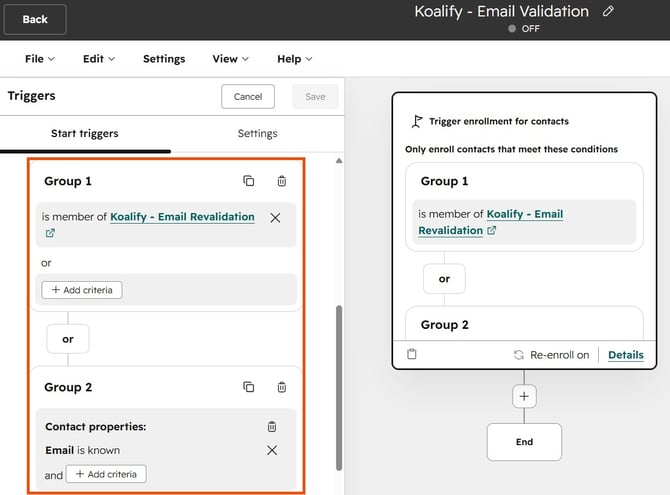
You control which contacts get enrolled and when:
- Automatic (recommended): Use Met filter criteria to enrol contacts when they are created or when their email address changes. With this setup, validation runs in the background without any manual work.
- Manual (one-off bulk validation): Enrol a specific list of contacts manually to validate your existing database in one pass.
3. Add the "Validate Email" action
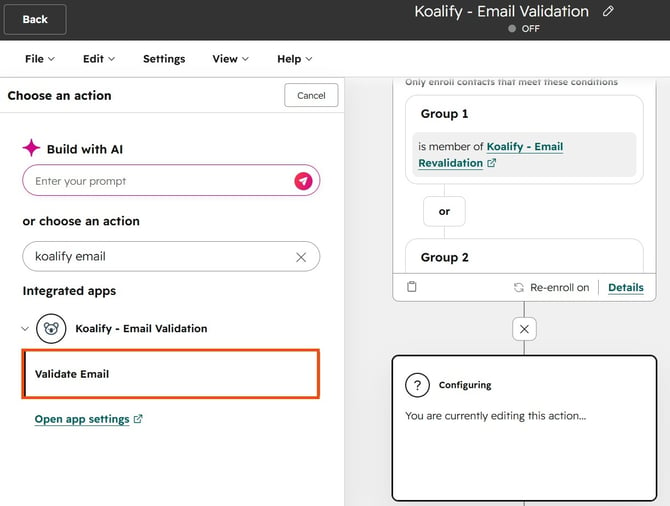
- Click on the ➕ plus icon to add a workflow action
- Search for "Koalify" to find our workflow action
- Select Validate Email Address and click Save
4. Re-validate contacts on a schedule (optional)
To re-validate contacts automatically over time, you need to create a HubSpot segment. This is required because HubSpot only allows re-enrolment into a workflow when a contact re-joins a list.
Create the list:
- In HubSpot, navigate to Contacts → Lists
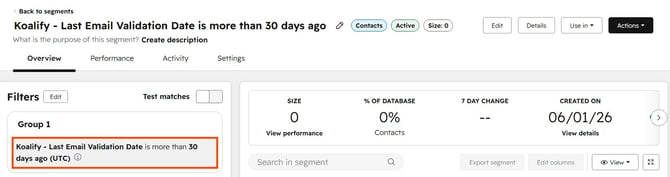
- Create an active list with the filter: Koalify - Last Email Validation Date is more than X days ago
- Set X to however frequently you want contacts re-validated (for example 30 days)
Add it as an enrolment trigger:
- Back in your workflow, add the list as an additional enrolment trigger
- Select Is a member of list and choose the list you just created
Once this is set up, contacts will re-enrol and be re-validated automatically each time they re-enter the list. No manual work needed.
5. Review and publish the workflow
Review your enrollment triggers and action one last time, then publish.
Koalify validates up to 100,000 email addresses per hour.
You may notice contacts appearing in the workflow action with a delay of up to 6 days. This is a HubSpot platform delay and does not affect Koalify's processing speed.