![koalify_rectangle_-3.png]](https://koalify.io/hs-fs/hubfs/koalify_rectangle_-3.png?width=50&height=50&name=koalify_rectangle_-3.png)
Before you begin
Make sure the Koalify Email Validation Card is enabled and visible in the right-hand sidebar of your contact records.
When to use the Email Validation Card
Use the card any time you want to check whether an email address on a contact record is deliverable, for example:
- Before enrolling a contact in a sequence or campaign
- After a data import or enrichment run
- When a contact's email looks suspect or was entered manually
How to validate an email
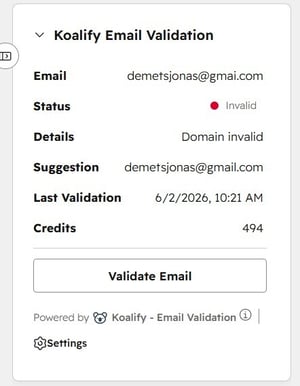
Open any contact record in HubSpot. In the right-hand sidebar, locate the Koalify Email Validation Card.
Click Validate to run an instant check on the email address currently saved to the contact.
The result appears immediately in the card, no leaving HubSpot.
What happens after validation
- The validation status is saved to the contact record and the Koalify Email Validation properties are updated
- The result is visible to anyone with access to the contact in HubSpot.
- You can re-validate at any time — for example, after updating the email address — by clicking Validate again.
Summary
With the Koalify Email Validation Card, you can:
- Validate any contact's email address in one click
- See the result immediately, directly on the record page
- Check validation status without leaving HubSpot
- Re-validate whenever an email address changes