---
title: How to create Custom Merge Rules in HubSpot with Koalify
description: With Custom Merge Rules, you control how each property is handled when HubSpot duplicates are merged with Koalify
---
[Skip to content](https://koalify.io/knowledge-base/how-to-create-custom-merge-rules-in-hubspot-with-koalify#main-content)
![koalify\_rectangle\_-3.png\]](https://koalify.io/hs-fs/hubfs/koalify_rectangle_-3.png?width=50&height=50&name=koalify_rectangle_-3.png)
Open main navigation
Close main navigation
- [GET STARTED FREE](https://api.koalify.io/hubspot/install?utm_source=koalify&utm_medium=knowledgebase&utm_campaign=navigation)
[GET STARTED FREE](https://api.koalify.io/hubspot/install?utm_source=koalify&utm_medium=knowledgebase&utm_campaign=navigation)
Search the Deduplication Knowledge Base 🐨
- There are no suggestions because the search field is empty.
1. [Koalify Knowledge Base](https://koalify.io/knowledge-base?hsLang=en)
2. [Koalify settings](https://koalify.io/knowledge-base/koalify-settings?hsLang=en)
# How to create Custom Merge Rules in HubSpot with Koalify
## With Custom Merge Rules, you control how each property is handled when HubSpot duplicates are merged with Koalify
By default, HubSpot keeps the primary record’s property values during a merge. With Merge Rules in Koalify, you can choose whether to keep, overwrite, or combine property values.
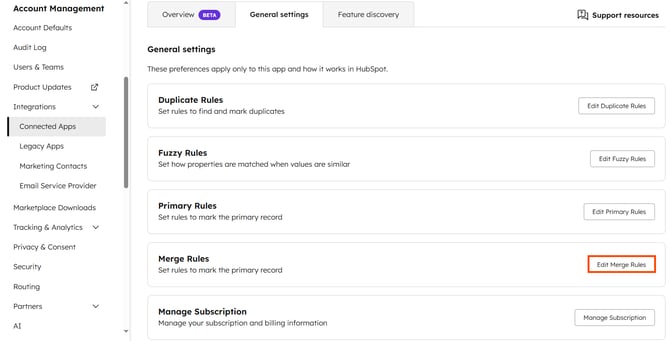
### 1. Navigate to the Koalify app settings page
- In your HubSpot account, click the ⚙️ **settings icon** in the main navigation bar.
- In the left sidebar, go to **Integrations \> Connected Apps.**
- Find"Koalify, Click the **Actions, Go to settings**
- In the Merge Rules section, click **Edit Merge Rules.**
****
### 2. Create new Merge Rule
- Navigate to the **Contact,** **Companies, Deals or Tickets** tab
- Click **Create Rule**
- Choose the **property** you want to customize
- Some properties (such as analytics or calculated fields) are read-only and won’t appear in Merge Rules
- Select how the property should be **handled during merge**
| Match Criteria | Description |
| --- | --- |
| **Append** | Appends all values for multi-select properties |
| **First updated** | Keeps the property value that was updated first |
| **Last updated** | Keeps the property value that was updated most recently |
| **Latest** | Keeps the latest property value of a date |
| **Earliest** | Keeps the earliest property value of a date |
| **Is known** | Retains the value if one is known and the other is empty |
| **Is unknown** | Keeps the unknown value if the other is populated |
| **Contains exactly** | Retains the value that contains the specified text |
| **Does not contain exactly** | Excludes values containing the specified text |
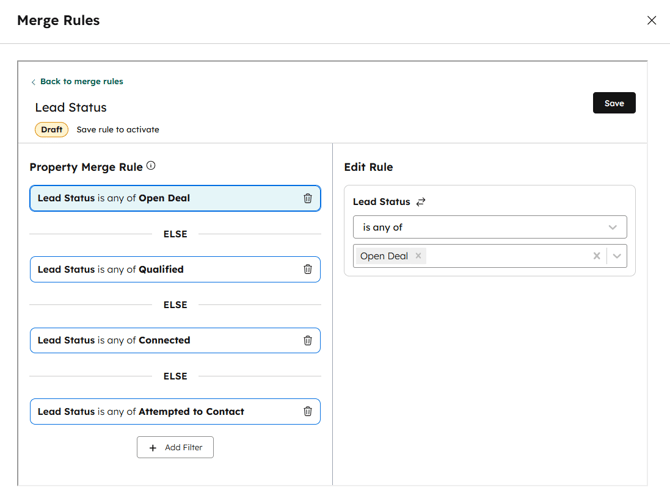
| **Is any of / Is equal to** | Keeps the value that matches the options you specify. Add multiple levels to set a priority order. Koalify works down the list and keeps the first value that matches. |
| **Is none of / Is not equal to** | Keeps the value that doesn't match the options you specify. Add multiple levels to set a priority order. Koalify works down the list and keeps the first value that qualifies. |
| **Sum** | Adds the values from both records and keeps the total |
| **Highest** | Keeps the highest value |
| **Lowest** | Keeps the lowest value |
- [Getting Started](https://koalify.io/knowledge-base/getting-started?hsLang=en)
- [Koalify settings](https://koalify.io/knowledge-base/koalify-settings?hsLang=en)
- [Duplicate overview](https://koalify.io/knowledge-base/duplicate-overview?hsLang=en)
- [Duplicate cards](https://koalify.io/knowledge-base/duplicate-cards?hsLang=en)
- [Bulk merging](https://koalify.io/knowledge-base/bulk-merging?hsLang=en)
- [Merges overview](https://koalify.io/knowledge-base/merges-overview?hsLang=en)
- [Unmerging](https://koalify.io/knowledge-base/unmerging?hsLang=en)
- [Account & Billing](https://koalify.io/knowledge-base/account-billing?hsLang=en)
[](https://koalify.io/?hsLang=en)
HubSpot deduplication and email validation
Copyright © 2026, Koalify
```json
{
"@context" : "https://schema.org",
"@type" : "VideoObject",
"caption" : {
"@type" : "MediaObject",
"contentUrl" : "https://koalify.io/media-transcripts/282185768146/en.vtt",
"inLanguage" : "en",
"name" : "en Captions"
},
"contentUrl" : "https://stream.mux.com/02005g2uSzYCXDhMb6wQ6HY02z93Q9U00lCm46wkMz52fOc/capped-1080p.mp4",
"dateModified" : "2026-03-02T13:32:11.059Z",
"duration" : "PT1M0.767S",
"height" : 2160,
"name" : "How to create Custom Merge Rules in HubSpot with Koalify (1)",
"thumbnailUrl" : "https://koalify.io/hubfs/How%20to%20create%20Custom%20Merge%20Rules%20in%20HubSpot%20with%20Koalify%20(1).mp4/medium.jpg",
"uploadDate" : "2025-10-02T09:17:14.392Z",
"width" : 3840
}
```