


HubSpot Native Deduplication vs. Koalify: The 2026 Comparison Guide
Duplicates rarely announce themselves. A rep calls a lead a colleague already spoke to, a workflow enrols the same contact twice, and the pipeline report stops matching what sales says is happening. What starts as a minor data quirk quickly scales into broken automation and revenue reporting you can’t trust.
HubSpot includes native tools to detect and merge duplicates. Koalify takes a different approach: deduplication as an automated, HubSpot-native tool with more control over how duplicates are detected, merged, and retained, across more objects.
The 10-Second Verdict
-
Choose HubSpot if you’re a small team with low record volume, mostly merging one by one, only need to clean contacts and companies, and can live with merges that can’t be undone.
-
Choose Koalify if you want automated bulk merging, support for custom objects, deals and tickets, fuzzy matching, a Salesforce integration that doesn’t block company merges, or a way to reverse a merge (one record or hundreds) if a rule gets it wrong.
| Feature | HubSpot | Koalify |
|---|---|---|
|
Primary focus |
Basic, built-in deduplication | Advanced HubSpot-native deduplication |
|
Ease of use |
⭐⭐⭐ |
⭐⭐⭐⭐ |
|
Pricing |
Free Accounts with limited deduplication 💲 |
💲 💲 |
| 1. SECURITY & COMPLIANCE | ||
|
SOC 2 Type II |
✅ Yes |
✅ Yes |
|
ISO 27001 |
✅ Yes |
✅ Yes |
|
GDPR |
✅ Yes | ✅ Yes |
|
EU/UK data residency |
✅ Yes | ✅ Yes |
| 2. HUBSPOT INTEGRATION | ||
|
Review duplicates in HubSpot |
✅ Yes |
✅ Yes |
|
Manual merge in HubSpot |
✅ Yes |
✅ Yes |
|
Bulk merge workflows |
❌ No |
✅ Yes |
|
3. OBJECT COVERAGE |
||
|
Merge contacts & companies |
✅ Yes |
✅ Yes |
|
Merge deals |
⚠️ Manual only (1-by-1) |
✅ Yes |
|
Merge tickets |
⚠️ Manual only (1-by-1) |
✅ Yes |
|
Merge custom objects |
⚠️ Manual only (1-by-1) |
✅ Yes |
|
Merge leads |
❌ No |
✅ Yes |
|
Merge line items and orders |
❌ No |
❌ No |
|
Companies with Salesforce |
|
✅ Yes |
| 4. MATCHING LOGIC | ||
|
Flexible matching rules |
❌ No |
✅ Yes |
|
Fuzzy & similar matching |
⚠️ |
✅ Yes |
|
5. MERGE BEHAVIOUR |
||
|
Flexible primary rules |
⚠️ 5 predefined options |
✅ Yes |
|
Property retention rules |
❌ No |
✅ Yes |
|
6. MERGE RECOVERY |
||
|
Unmerge a single record |
❌ No |
✅ Yes |
|
Bulk unmerge |
❌ No |
✅ Yes (via workflow) |
1) Duplicate detection: HubSpot native vs Koalify
HubSpot Native Detection
HubSpot can identify potential duplicates and, for many teams, it’s enough for basic cleanup early on. But as your portal grows, two things usually happen:
-
Rigid matching misses real duplicates (format differences, near-matches)
-
Loose matching creates false positives, which makes bulk cleanup risky
Koalify detection (what changes)
Koalify is rule-based and designed for day-to-day operations:
-
Create multiple duplicate rules per object
-
Use cross-field matching (e.g., mobile phone ↔ phone)
-
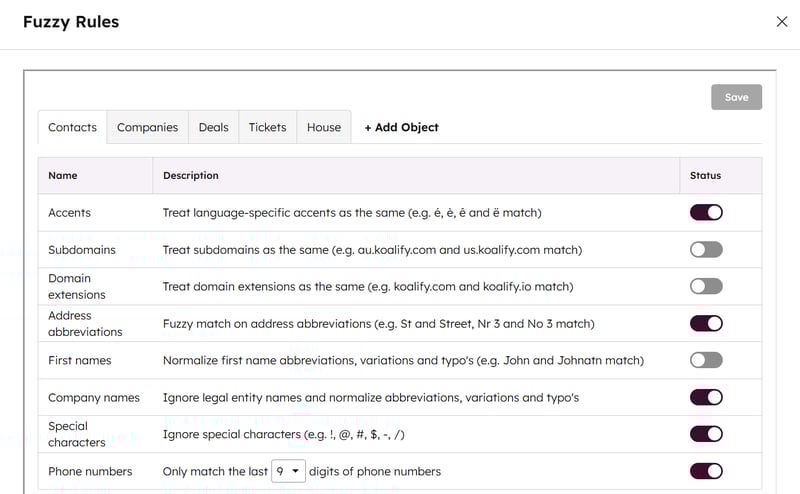
Use fuzzy matching where exact matches fail (names, company variants, phone formatting)
2) Merging at scale: manual merges vs automated workflows
HubSpot native merge options (typical workflow)
In HubSpot, you must navigate to the "Manage Duplicates" screen and manually click "Merge" for every pair.
For a database with 500 duplicates, this is an afternoon of manual labour. For a portal with a 50,000-record backlog, merging 1,000 a day by hand takes 50 days, and new duplicates keep arriving from imports and integrations while you work.
Koalify merging (operational model)
Koalify supports:
-
Manual merges directly in HubSpot via CRM cards when you need human context
-
Bulk merging through HubSpot workflows when you have high-confidence rules (e.g. First Name + Last Name + Company Name)
This is what makes deduplication sustainable:
-
Admins define the rules once
-
Workflows handle the repetitive merges
-
Your team stays out of manual cleanup mode

3) Merge behaviour control: primary record + property retention
HubSpot native: limited merge behaviour control
Native tools work well when you manually choose values while merging a single pair, but once you need consistency at scale, teams often want:
-
reliable primary record logic
-
predictable property retention
-
safe automation without overwriting critical fields
Koalify: merge behaviour built for automation
Koalify adds two critical capabilities:
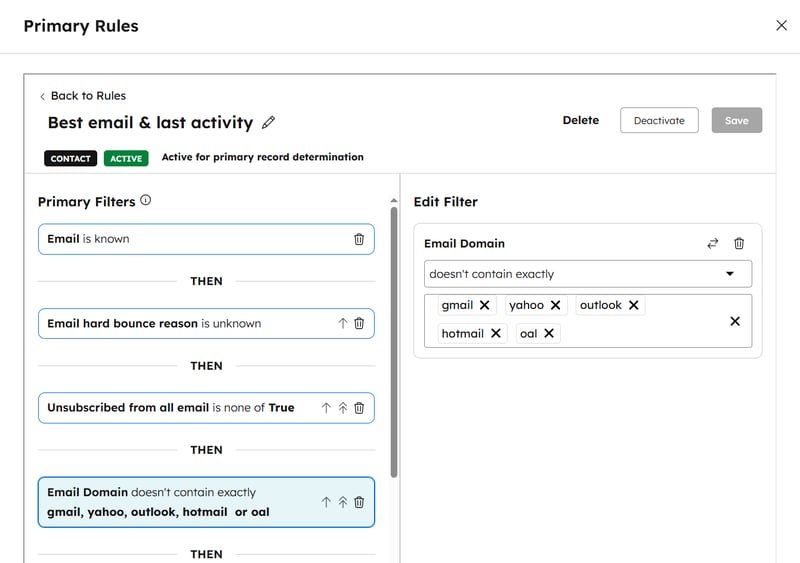
1) Primary record rules (waterfall logic)
Pick the “master record” based on your actual business logic (IDs, email presence, bounce status, lifecycle, etc.).
2) Property retention rules
Decide field-by-field how values should be retained during bulk merges (append multi-select values, preserve first-touch source properties, keep preferred owner logic, etc.).
This is why Koalify is better suited for automated merging: you’re not “hoping” the merge turns out right, you’re defining the behaviour, and if a rule gets it wrong, you can reverse it.
4) Undoing a bad merge: no unmerge vs single and bulk unmerge
HubSpot native: merges are permanent
Once two records are merged in HubSpot, they can’t be separated. There’s no undo button, and HubSpot support can’t reverse it. The only fix is to create a new record, copy the old values back from property history, and re-associate contacts, deals and activities by hand. That’s manageable for one mistake. It isn’t manageable when a duplicate rule matched on a shared domain and merged 400 companies over a weekend.
Koalify: every merge can be reversed
Koalify stores a snapshot of both records at the moment of every merge, logged as a Koalify Merge record inside HubSpot. That gives you two ways back:
-
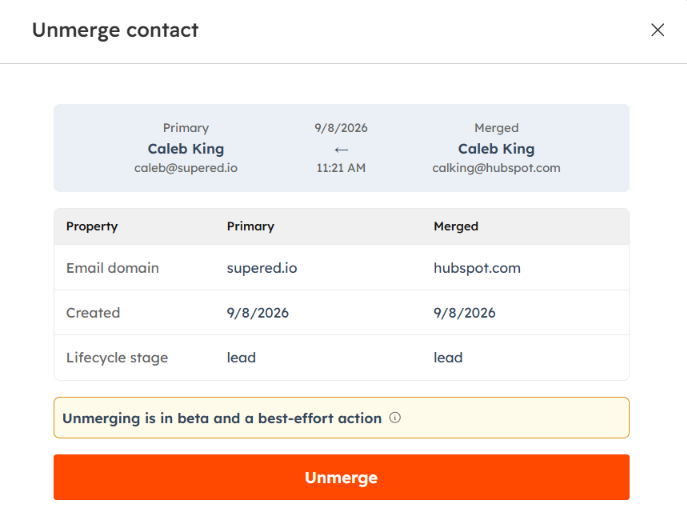
Unmerge a single record from the Koalify event on its timeline, and mark the pair as non-duplicates so it isn’t flagged again
-
Bulk unmerge through a workflow: filter the bad merges by workflow, duplicate rule or date, enrol them, and track each one from Merged to Unmerged
A few honest limits: Koalify can only unmerge merges it made itself, unmerge currently covers contacts and companies, and the restored record gets a new HubSpot record ID.
This changes the risk of switching on automation. You still test rules on a small segment first, but a rule that turns out too loose is no longer permanent. For the full walkthrough, see how to undo a merge in HubSpot.
When teams outgrow HubSpot native deduplication
Teams usually move beyond native dedup when:
-
duplicates come from multiple sources (imports, integrations, forms)
-
exact-match logic misses too many duplicates
-
they need dedup beyond contacts/companies
-
they want workflow-based bulk merging
-
they need stronger protection against overwriting important data
-
they need a way to undo a merge when a rule or a click gets it wrong
Final verdict
If your portal is simple and you’re okay with manual review, HubSpot’s native tools can work.
If you want deduplication to stay solved, with flexible rules, automated workflows, controlled merge behaviour and a way back from a bad merge, Koalify is built for that operating model.
For a broader review of other deduplication tools, see our guide to the best HubSpot deduplication apps.
🎥 Live Comparison: HubSpot Native Deduplication vs Koalify
Below is a real, live walkthrough from a HubSpot Admin community session, where Koalify’s founder demonstrates:
-
HubSpot’s native duplicate detection and merge behaviour
-
Koalify’s rule-based detection, workflow merges, and merge control
-
Real-world edge cases admins run into at scale
-
How automated deduplication can be done safely inside HubSpot