


ZeroBounce vs Koalify for HubSpot: which email validation tool fits
The short answer: ZeroBounce is a full email deliverability platform with a HubSpot integration you manage from the ZeroBounce dashboard. Koalify is an email validation app that runs inside HubSpot as a workflow action and a contact-record card. Choose ZeroBounce if you want validation plus warmup, inbox placement and DMARC tools in one subscription. Choose Koalify if HubSpot is your main CRM and you want every contact validated on entry, at a fraction of the price.
Your forms, your Apollo and Clay exports, and last month's webinar import are all feeding contacts into HubSpot. Some of those addresses were dead before they arrived. HubSpot only finds out when you email them and they bounce, and by then your sender reputation has already taken the hit.
If you're looking at the ZeroBounce HubSpot integration, you already know you need mailbox-level verification, not just a format check. ZeroBounce is accurate, mature and well integrated. The real question is narrower: do you want validation managed from a separate deliverability platform, or built into the HubSpot workflows that create and route your contacts?
This page compares the two on how each connects, when checks happen, where your data goes and what you pay. For the wider field, see our guide to the best email validation tools for HubSpot.
Which should you choose? (TL;DR)
- Choose ZeroBounce if you need more than validation (email warmup, inbox placement tests, blacklist and DMARC monitoring) or you verify email across several platforms, not only HubSpot.
- Choose Koalify if HubSpot is your main CRM and you want validation as a step in your own workflows, with results on native HubSpot properties, for around a tenth of the price.
Last updated: October 2026 (reviewed quarterly)
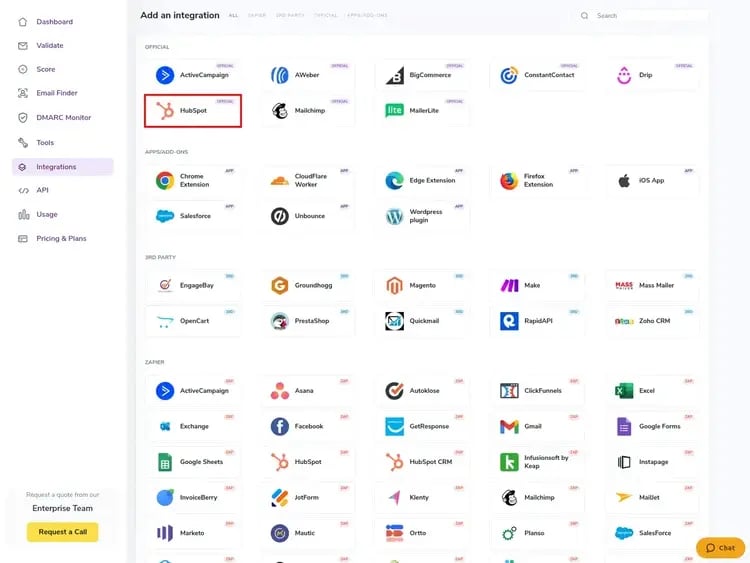
ZeroBounce vs Koalify: feature comparison
Both tools run mailbox-level verification, and both hold the certifications most security reviews ask for. The differences that matter for a HubSpot team are where you manage validation, how it fits your workflows and what you pay. Competitor certifications and pricing change, so confirm them against each vendor's trust centre and pricing page.
| Feature | Koalify | ZeroBounce |
|---|---|---|
| Primary focus | HubSpot-native email validation | Email deliverability platform (validation, scoring, warmup, monitoring) |
| Ease of use (for a HubSpot team) | ⭐⭐⭐⭐ | ⭐⭐⭐ |
| Pricing | 💲 $5/mo per 10K validations (annual) or $10/mo (monthly) | 💲💲💲💲💲 ZeroBounce ONE from $99/mo for 10K credits, or pay-as-you-go from $39 for 2,000 |
| 1. SECURITY & COMPLIANCE | ||
| SOC 2 Type II | ✅ Yes | ✅ Yes |
| ISO 27001 | ✅ Yes | ✅ Yes |
| GDPR | ✅ Yes | ✅ Yes |
| Where data is processed | London (UK) | EU/US servers (US-headquartered company) |
| 2. HUBSPOT INTEGRATION | ||
| Validate without leaving HubSpot | ✅ Yes | ❌ No, managed in the ZeroBounce dashboard |
| Results on HubSpot contact properties | ✅ Yes, ready-made properties | ✅ Yes, via results mapping |
| One-click check on the contact record | ✅ Yes | ❌ No |
| Validate on entry as a HubSpot workflow step | ✅ Yes | ⚠️ Contact Monitoring on synced lists, not a workflow action |
| Scheduled re-validation of lists | ✅ Yes, Control with workflow re-enrolment | ✅ Yes, Scheduling (e.g. every 30 days) |
| 3. VALIDATION MODES | ||
| Bulk validation | ✅ Yes | ✅ Yes |
| Real-time validation on entry | ✅ Yes | ✅ Yes |
| 4. VALIDATION CHECKS | ||
| Syntax + domain / MX | ✅ Yes | ✅ Yes |
| Mailbox-level check | ✅ Yes | ✅ Yes |
| Catch-all detection | ✅ Yes | ✅ Yes |
| Role-based / disposable flags | ✅ Yes | ✅ Yes |
| Spam-trap indication | ✅ Yes | ✅ Yes |
| Typo correction | ✅ Suggested email | ✅ Suggested email |
| 5. BEYOND VALIDATION | ||
| Email scoring and activity data | ❌ No | ✅ Yes (extra credits) |
| Warmup, inbox placement, DMARC, blacklist tools | ❌ No | ✅ Yes, in ZeroBounce ONE |
Pricing figures are indicative and based on publicly available information as of October 2026. Actual pricing may vary by contract, region, volume and feature set.
How do ZeroBounce and Koalify compare for HubSpot teams?
1. How does ZeroBounce integrate with HubSpot?
In short: ZeroBounce syncs your HubSpot lists into its own dashboard and writes results back; Koalify runs inside HubSpot itself.
Why it matters: This decides who can run validation, how easily it's automated, and whether it keeps running once the first cleanup is done.
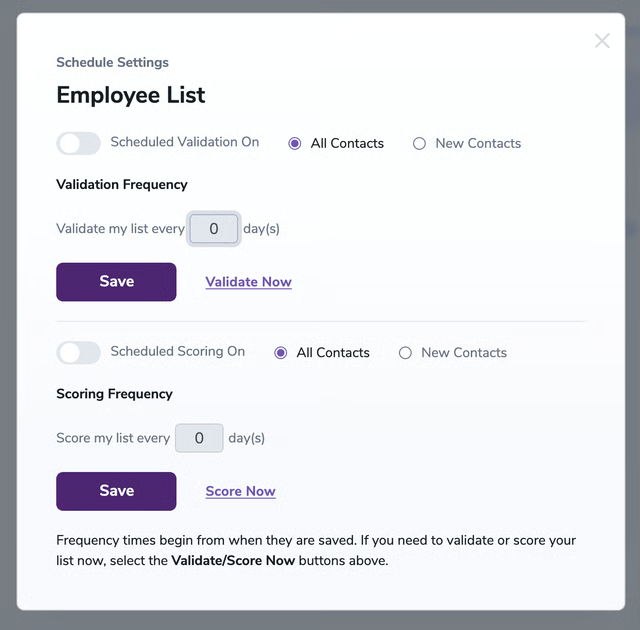
How they differ: To be fair to ZeroBounce, its HubSpot integration is a proper HubSpot Certified App, not a Zapier workaround. Once you connect it, ZeroBounce imports your HubSpot lists. From its dashboard you can validate a list in one click, schedule re-validation, and switch on Contact Monitoring so new contacts on a list are checked automatically. Results are mapped back to HubSpot contact properties you can rename.
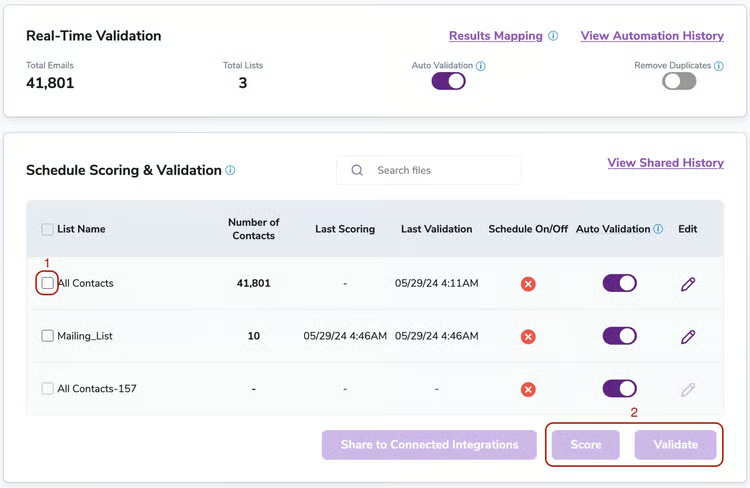
What stays the same is where the work is managed: in a second platform, with its own login, credit balance and view of your lists.
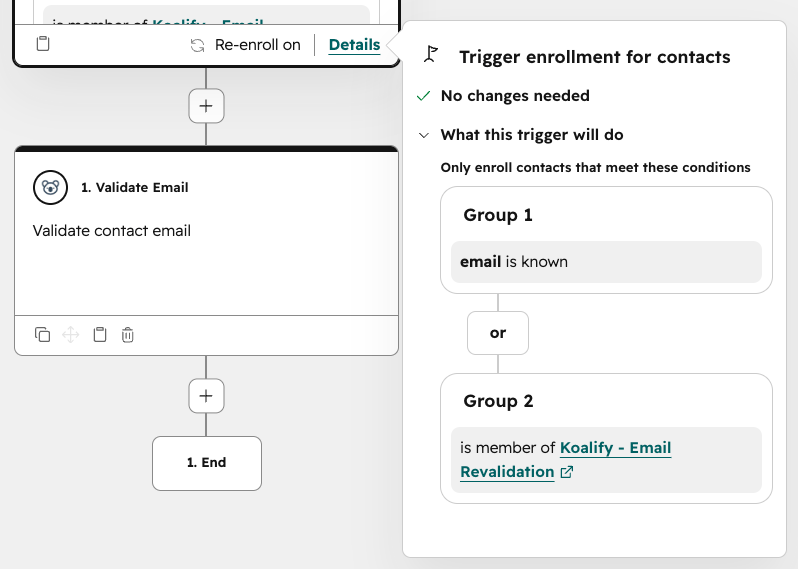
Koalify runs where your team already works. A HubSpot workflow action validates contacts in bulk and on entry. A card on the contact record checks any address in one click, which is handy before a rep enrols someone in a sequence. Every result lands on a native HubSpot property with a status and the reason behind it, ready for lists, reports and suppression rules.
2. Does it validate on entry, on a schedule, or both?
In short: ZeroBounce checks new contacts on the lists you choose to monitor; Koalify checks them as a step in any HubSpot workflow you add it to.
Why it matters: Bad addresses don't arrive once a quarter. They arrive daily, through form typos, enrichment tools like Apollo and Clay that guess addresses, and event or partner imports. Once the backlog is cleared, this is the difference that matters most.
How they differ: ZeroBounce handles on-entry checks in two ways. Contact Monitoring validates new contacts added to a monitored list, and a script on your HubSpot forms can block bad addresses at submission. Both work well, but they run alongside your workflows rather than inside them.
With Koalify, validation is a step in the workflow that creates or routes the contact. You decide exactly when it runs and branch on the result: valid contacts continue to the nurture, invalid ones never reach a send, and catch-alls go to a review list. For a monthly re-check, you set which contacts re-enrol in the workflow. That takes a little more setup than ZeroBounce's built-in scheduler, but you choose exactly who gets re-checked and when.
3. Where is your contact data processed?
In short: ZeroBounce processes data in both the EU and the US; Koalify processes everything in London.
Why it matters: Mid-market and enterprise teams need a tool to pass a security review. For EU and UK teams, where contacts are processed often decides whether a tool can be approved at all.
How they differ: Both tools clear the usual security bar. ZeroBounce holds SOC 2 Type II and ISO 27001, is HIPAA compliant, and deletes uploaded data after 30 days. Koalify holds SOC 2 Type II and ISO 27001.
The difference is where your contacts go. ZeroBounce runs data centres in the EU and the US, and since October 2025 its API routes each request to the nearest region by default. It offers an EU-only endpoint for teams that need one, but that's a choice someone has to make and maintain, so confirm which region the HubSpot integration uses for your account. Koalify has one processing location, London, so there's no region to configure.
Two more points for your compliance team. ZeroBounce imports your HubSpot lists into its platform, while Koalify only checks the addresses your workflow or card sends it and writes the result straight back to HubSpot. And ZeroBounce is US-headquartered, so some EU and UK teams will treat it as a transatlantic processor whichever region it uses. If your policy requires UK residency, or one fixed location you can name in a DPA, Koalify is the simpler fit.
4. Which is more accurate?
In short: Both run the same layers of checks. Treat accuracy as comparable and decide on the other criteria.
Why it matters: Syntax and domain checks are table stakes. Mailbox-level verification and risk flags are what separate real validation from format checking.
How they differ: ZeroBounce guarantees 99.6% accuracy and doesn't charge for "unknown" results, which is a fair policy. Koalify runs the same checks (SMTP, catch-all, role-based, disposable and spam-trap flags) at 99%+ accuracy and returns a context-rich status, so you can make the call on grey areas yourself.
5. How much does ZeroBounce cost compared with Koalify?
In short: Koalify costs $10 a month for 10,000 validations on a monthly plan, or $5 billed annually. ZeroBounce ONE starts at $99 a month for the same 10,000 credits, so Koalify is roughly 10x cheaper at that volume.
Why it matters: Validation isn't a one-off if your CRM keeps taking in new contacts. The billing model shapes your total cost more than the headline rate.
How they differ: ZeroBounce ONE is a subscription from $99 a month (about 20% less billed annually) for 10,000 credits, plus warmup, inbox placement tests, DMARC and blacklist monitoring. Unused credits roll over while you subscribe. Pay-as-you-go starts at $39 for 2,000 credits, about $19.50 per 1,000, with lower rates at volume. Email scoring costs an extra credit per address. The free plan gives 100 credits a month.
If you'll use the deliverability tools, ONE is fair value. If you only need validation in HubSpot, you're paying for a suite you won't open. Koalify prices by validation volume, from $5 a month billed annually for 10,000, with re-validation, unlimited users and support included. See Koalify email validation pricing for your volume.
When is ZeroBounce the better fit?
ZeroBounce is the stronger choice when validation is only one part of your deliverability problem. If you're launching a new sending domain, recovering from a spam-folder spell, or need DMARC and blacklist monitoring, ZeroBounce ONE puts all of that alongside validation in one account. Koalify does validation only.
It's also the better fit if you verify addresses outside HubSpot (in Mailchimp, Klaviyo or a product sign-up flow), since ZeroBounce connects to 60+ platforms from one credit balance. And if some of your portals run on HubSpot tiers without workflows, ZeroBounce's Contact Monitoring and Scheduling still automate validation there. In those portals, Koalify is limited to one-click checks on the contact card.
Looking for a ZeroBounce alternative for HubSpot?
If HubSpot is where your contacts live and validation is what you need, Koalify is the closest ZeroBounce alternative that works natively inside it. You get the same mailbox-level checks, managed through HubSpot workflows, a contact-record card and native properties, without a separate dashboard or a deliverability suite you won't use.
Decision checklist
Choose ZeroBounce if:
- You want warmup, inbox placement tests, DMARC and blacklist monitoring alongside validation
- You verify email across several platforms, not just HubSpot
- You want email scoring or activity data to prioritise engaged contacts
- Some of your portals have no HubSpot workflows and you still want automated validation
- You need HIPAA compliance from your validation vendor
Choose Koalify if:
- HubSpot is your system of record and you'd rather not manage validation from a second platform
- You want validation as a step in your own workflows, so you control exactly when it runs and what happens next
- You want results on native HubSpot properties you can filter, report and suppress on
- You need UK data residency, or prefer a tool that only sees the contacts your workflow sends it
- You want the lowest cost per validation: from $5 a month for 10,000
ZeroBounce and HubSpot: frequently asked questions
Does ZeroBounce integrate with HubSpot?
Yes. ZeroBounce has a HubSpot Certified App that imports your HubSpot lists into the ZeroBounce dashboard, validates them in bulk or on a schedule, and writes results back to contact properties. Contact Monitoring checks new contacts added to a monitored list, and a form script can block bad addresses on HubSpot forms. Setup and results are managed from ZeroBounce, not inside HubSpot.
Can ZeroBounce validate emails inside HubSpot workflows?
Not as a validation step you place in a workflow. ZeroBounce validates through its own list sync, Contact Monitoring and API, and HubSpot workflows can then act on the results it writes back. Koalify adds an email validation action directly to HubSpot workflows, so you can validate a contact at the exact point it's created or routed and branch on the result.
Is ZeroBounce GDPR compliant, and where does it store data?
ZeroBounce states that it is GDPR compliant and holds SOC 2 Type II and ISO 27001. It runs data centres in both the EU and the US: by default its API routes requests to the nearest region, and an EU-only endpoint is available for teams that need it. Uploaded data is deleted after 30 days. ZeroBounce is headquartered in the US, so review its data processing agreement with your compliance team. If your contacts need to stay in the UK, Koalify processes everything in London.
How much does ZeroBounce cost for HubSpot?
The HubSpot integration itself is free. Validation costs one credit per address: the free plan includes 100 credits a month, pay-as-you-go starts at $39 for 2,000 credits, and ZeroBounce ONE starts at $99 a month for 10,000 credits plus its deliverability tools. For comparison, Koalify costs $10 a month (billed monthly) or $5 a month (billed annually) for 10,000 validations.
What is the best ZeroBounce alternative for HubSpot?
For teams that run HubSpot as their main CRM and only need email validation, Koalify is the closest ZeroBounce alternative that works natively inside HubSpot. It validates through HubSpot workflows and a contact-record card, writes results to native properties, and costs roughly a tenth of ZeroBounce ONE at 10,000 validations a month. If you verify across several platforms, NeverBounce and Kickbox are other standalone options.
Can I validate emails in HubSpot without exporting contacts?
Yes, with either tool. Both ZeroBounce and Koalify skip manual CSV exports. The difference is where validation is managed: from ZeroBounce's dashboard on the lists it syncs, or inside a HubSpot workflow with Koalify.
Can I switch from ZeroBounce to Koalify without losing past results?
Yes. Koalify writes results to its own HubSpot properties, so any fields your ZeroBounce integration populated stay as they are. Most teams point Koalify at new contacts first, then re-validate the older backlog when it suits them.
Validate inside the workflows you already run
If HubSpot is where your contacts arrive, it's where they should be checked. Install Koalify free, add the validation action to the workflow that creates your contacts, and see which addresses would have bounced, with no second dashboard and your data kept in London.