

How to Automate Parent–Child Company Associations in HubSpot
You have 50 franchise locations in HubSpot. They all share the same domain. Every time a new contact comes in, HubSpot associates them to the oldest matching company, which is always the HQ, never the right local office.
Or you have a portfolio of subsidiaries. Same parent domain, different cities. You want each one to sit correctly under the group HQ in your CRM, but manually setting that relationship for hundreds of records is not feasible.
HubSpot supports parent–child company associations, including the ability to create them automatically. But there is a hard limit built into the native tool: it can only match on one identical property. The moment your logic depends on more than one signal, such as domain plus city, LinkedIn page plus a custom field, or website plus region, the native automatic association cannot help you.
This guide walks through how to set up flexible, rule-based parent–child associations in HubSpot that work on multiple matching properties, and how to automate them continuously using HubSpot workflows without any custom code.
Merge vs. associate: quick orientation. If you have two records for the same company that should be one record, you want to merge them. If you have two records for related but distinct entities (HQ and subsidiary, parent and franchise location) that should stay separate but connected, you want to associate them. This guide covers the association scenario. If you are dealing with true duplicates, see our guide on when to merge vs. associate companies in HubSpot.
Why HubSpot's Native Automatic Association Falls Short
HubSpot's built-in automatic association lets you link company records when a single property matches exactly. Common use cases: same domain name, same custom account ID, same billing code.
That works well when your hierarchy logic is simple. It breaks down in a few common scenarios:
Franchises and multi-location businesses where every location shares the HQ domain but operates from a different address. HubSpot has no way to distinguish them using domain alone.
Subsidiaries under a holding company where naming conventions vary, domains differ, and the only reliable signal is a shared LinkedIn company page or a custom group ID property.
Post-migration setups where parent–child relationships existed in the source system but were not preserved during import and need to be rebuilt at scale.
When single-property matching is not enough, most teams hit the same dead end: HubSpot workflows cannot create associations natively, and doing it manually record by record is not realistic at scale. The usual workarounds, such as custom-coded Operations Hub solutions or import files, either require developer support or only handle the historical backlog, not the ongoing flow of new records.
The approach below solves this using Koalify's rule engine alongside HubSpot workflows, combining flexible multi-condition detection with native HubSpot automation to keep your company hierarchy accurate and up to date automatically.
Step 1: Use Koalify Duplicate Rules to Detect Parent–Child Relationships
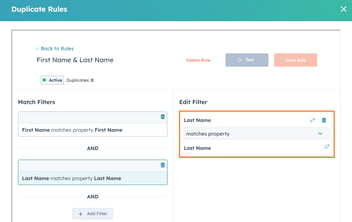
Although Koalify is primarily used for deduplication, its rule engine can detect related records just as easily as true duplicates. You define your own logic, and the rule does not have to mean "these should be merged."
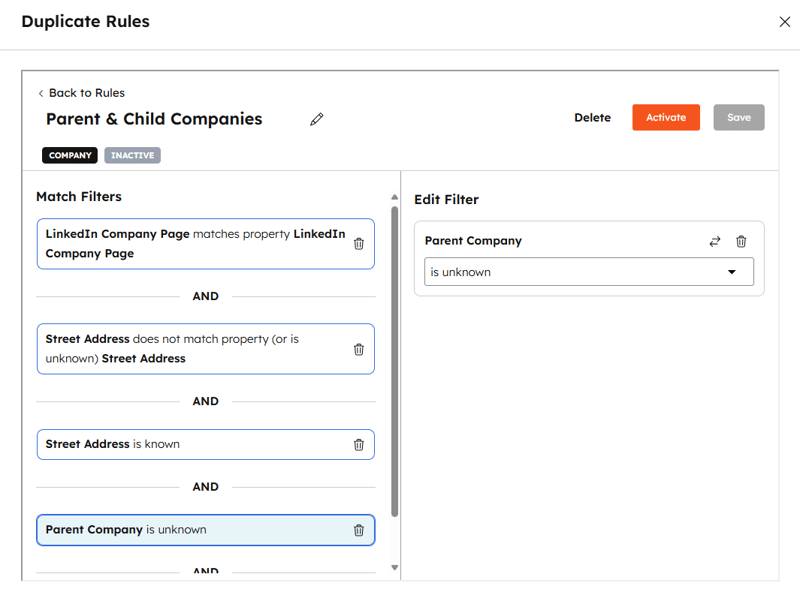
For a franchise or multi-location setup, you might flag related companies when:
- the domain name or LinkedIn company page matches
- the location details (street address, city, state, or region) differ and are known
- the company does not already have a parent company assigned
For example, these four records would be detected as related:
- McDonald's HQ
- McDonald's, 1528 Broadway, New York, NY 10036
- McDonald's, 600 N. Clark St, Chicago, IL 60654
- McDonald's, 14/16 Blake Street, London
Same core identifiers. Different addresses. With Koalify, you create a rule that detects this pattern automatically across your entire company database, not just the records you happen to check manually.
Step 2: Define Primary Rules to Identify the HQ
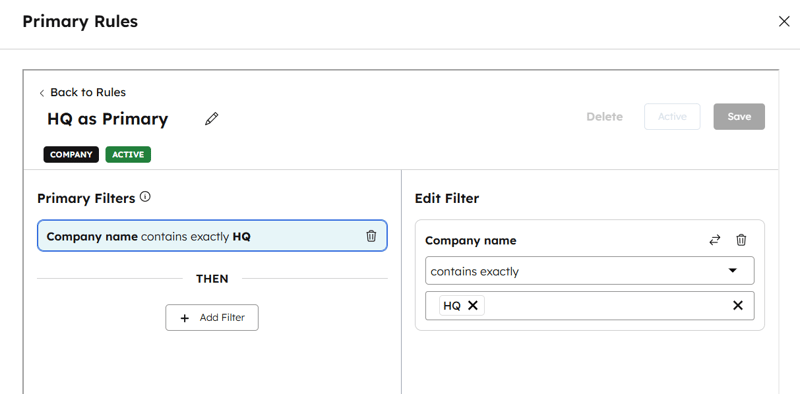
Once Koalify detects a set of related companies, you define a primary rule: the logic that determines which record becomes the parent (the HQ).
For example:
- company name contains "HQ"
- a custom property like
is_headquartersis set to true - a specific account tier field
Koalify assigns a Koalify Primary Duplicate ID to the parent record. This ID is stable and always points to the HQ, which becomes the key to automating the association in the next steps.
Step 3: Validate the Rule in HubSpot
Before switching anything to automatic, validate that your detection logic is working as expected.
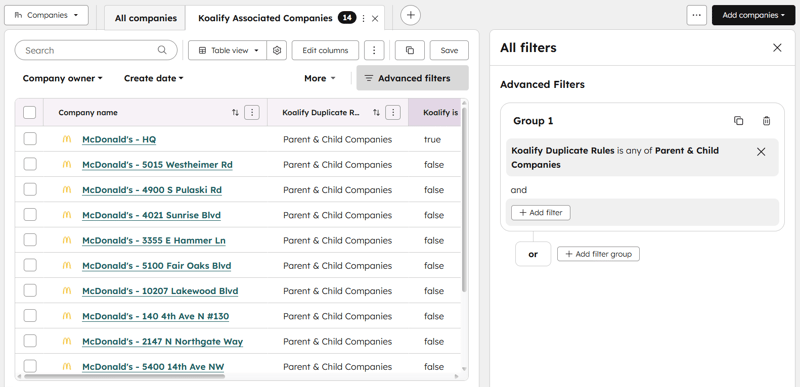
- Go to Companies in HubSpot
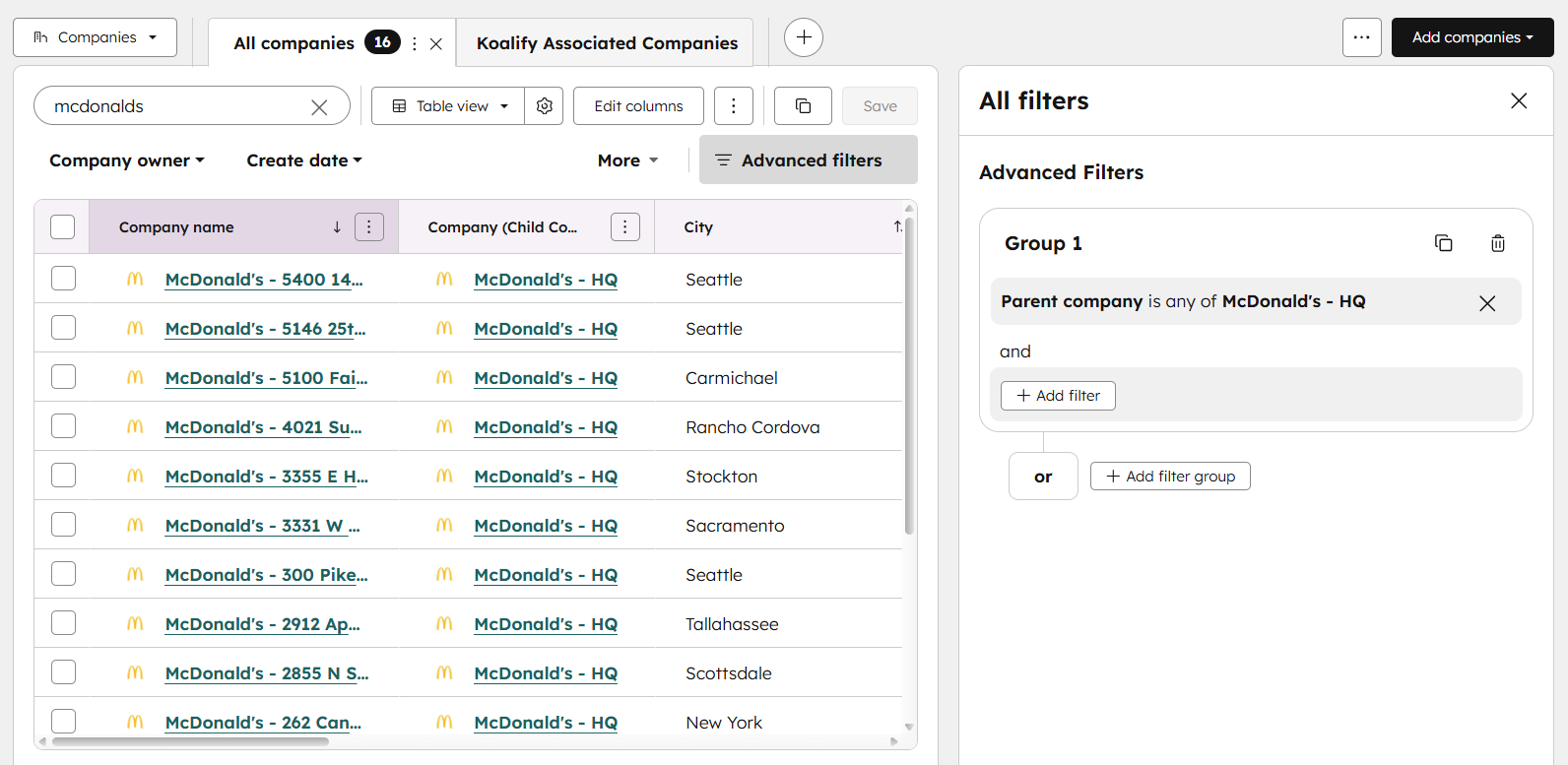
- Create a filter using the Koalify duplicate rule you just created
- Review the companies that appear; these are the records Koalify has identified as matching your parent–child criteria
At this stage, nothing has been associated. You are confirming the logic is picking up the right relationships before you let it run.
This is worth spending a few minutes on. A rule that picks up the wrong records is easier to fix now than after a workflow has run across your whole database.
Step 4: Create an Automatic Association Workflow
Now the automation. In HubSpot:
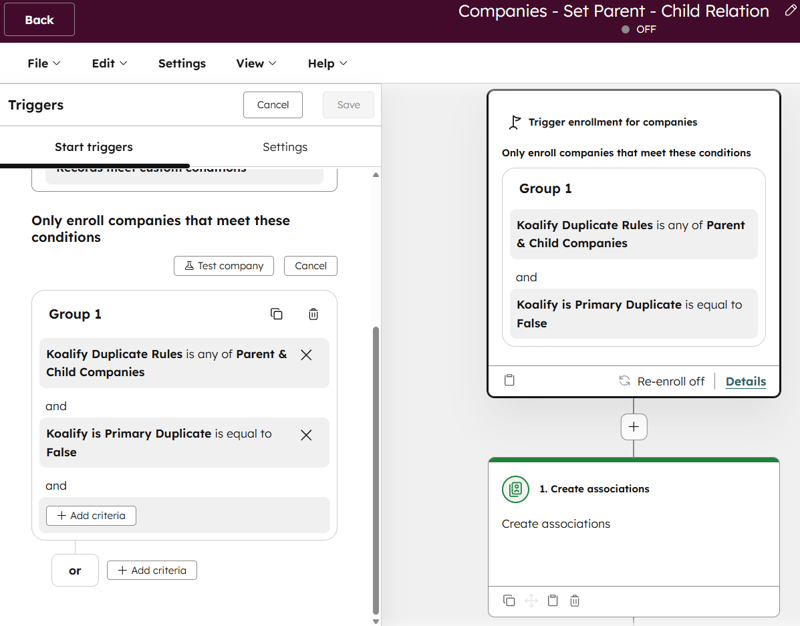
- Create a new company-based workflow
- Set the trigger to "When filter criteria is met"
- Use the Koalify duplicate rule as your enrolment trigger
- Enrol only child companies by excluding records where
Koalify Primary Duplicateis true
This ensures only the child companies pass through the workflow. The parent (HQ) record stays untouched.
Step 5: Configure the Association Action
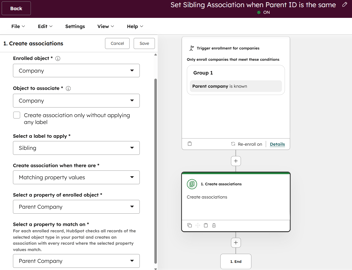
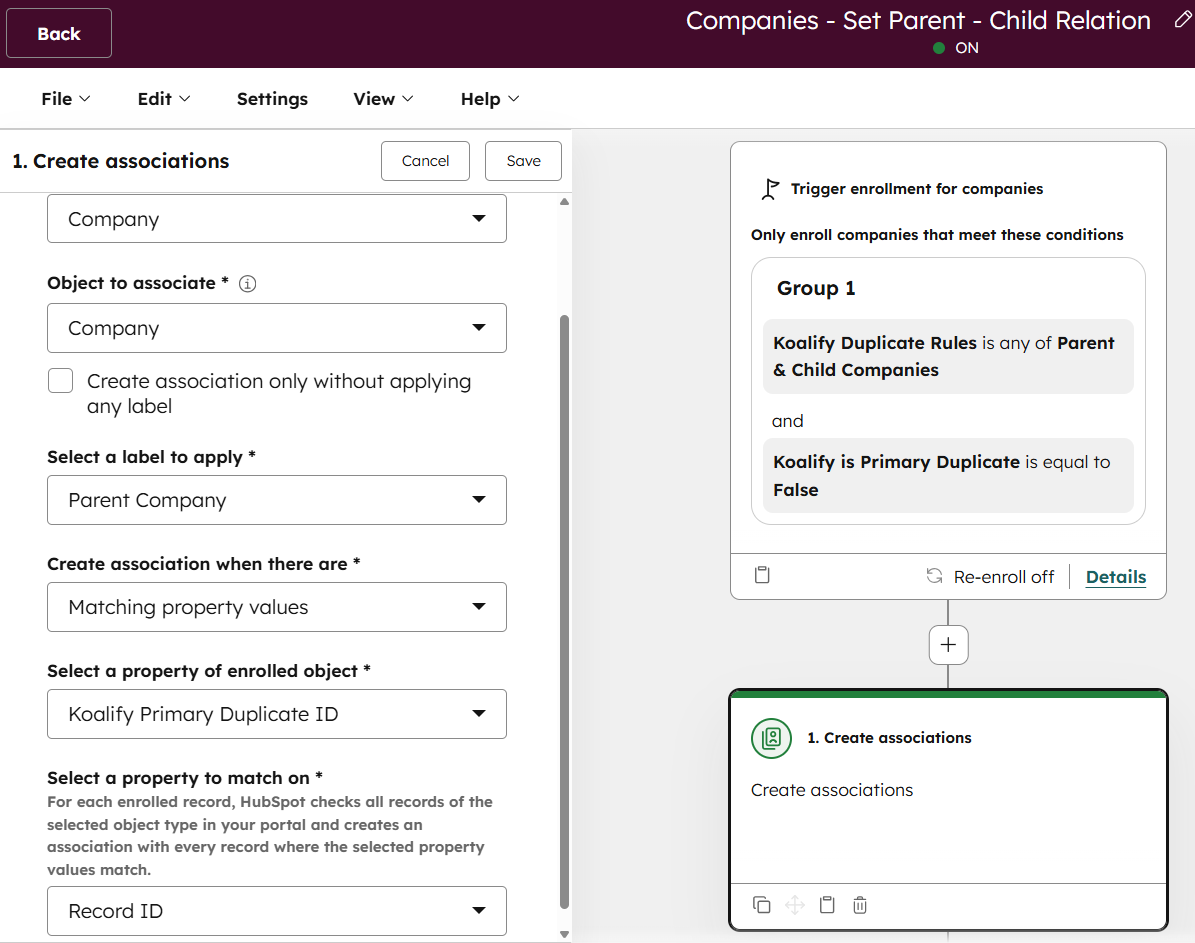
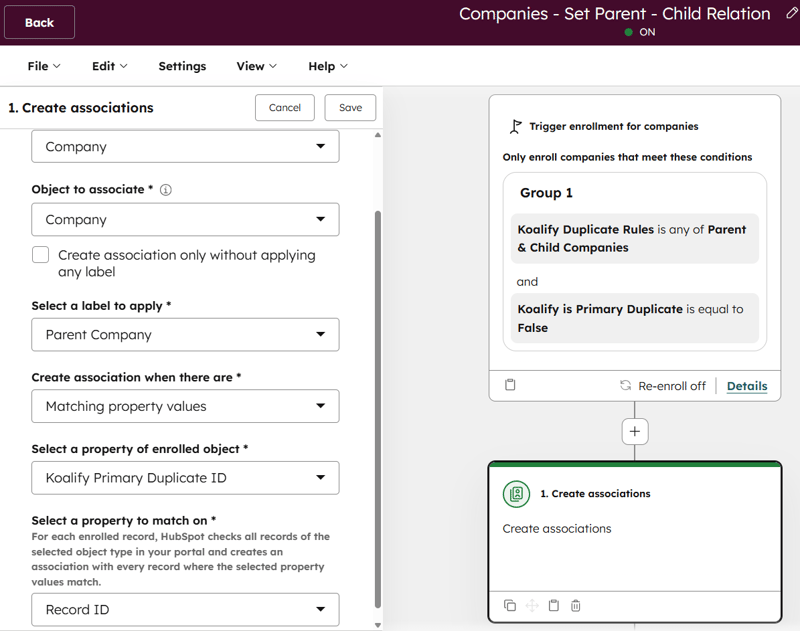
Add the workflow action: Associate record with another record
Set:
- Object: Company
- Association label: Parent company
Here is where the setup pays off. Instead of matching on a single property (the limit of HubSpot's native tool), you match:
- Koalify Primary Duplicate ID on the child company
- With the Record ID of the parent company
Because Koalify guarantees the Primary Duplicate ID always points to the HQ record, HubSpot can resolve the correct parent and create the association automatically, with multi-condition logic rather than a single property match.
Step 6: Test Automatic HubSpot Associations with Manual Enrollment
Before turning on full automation:
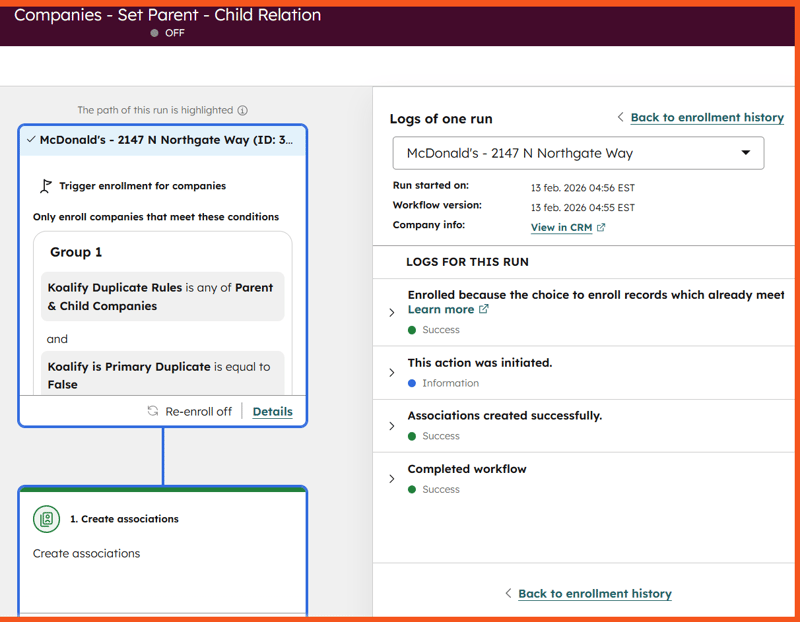
- Manually enrol a single child company into the workflow
- Check the enrolment history and workflow logs
- Confirm the parent association was created correctly on the record
You should see a parent company association label on the child record with the correct HQ linked.
Once confirmed, you can extend the setup further. For example, you can create sibling associations between child companies in the same group, or add additional association labels for more complex hierarchies.
Important Note on Existing Parent–Child Relationships
If records are already associated with each other, Koalify will not flag that relationship again. It will move to the next best match in the set. To avoid unexpected behaviour, either:
- exclude companies that already have a parent company assigned from the duplicate rule's enrolment criteria (as shown in Step 4), or
- set up sibling associations between child companies so the full group is connected, not just each child to the parent
This is especially relevant when building out associations on top of an existing partial hierarchy, where some parent–child relationships are already in place and others are not.
Fully Automate the Process
Once you have validated the test enrolment:
- Switch from manual to automatic enrolment
- Enrol existing companies to backfill historical records
- Leave the workflow running
From that point, whenever a company enters HubSpot and matches your rule criteria, it is automatically detected as a child record and associated to the correct HQ. No manual review, no import files, no recurring maintenance.
This works for franchises with shared domains and different locations, multi-location businesses with regional offices under a single brand, subsidiaries as separate legal entities under a holding company, SaaS companies with a single corporate domain across multiple international offices, and post-migration account hierarchies where relationships existed in the source CRM but were not carried over.
Final Thoughts
HubSpot's built-in automatic association handles straightforward cases well. But if your company hierarchy depends on more than one property, any combination of signals that HubSpot cannot evaluate natively, you need more control than a single-property match allows.
By combining Koalify's rule engine with HubSpot workflows, you can build automated parent–child associations that reflect how your accounts are actually structured, stay accurate as new records come in, and do not require anyone to maintain them by hand.
If you are also dealing with records that should be merged rather than associated, the merge vs. associate decision guide covers how to tell the difference and which approach fits which scenario.