

Merging duplicate companies in HubSpot sounds simple, until domains, subsidiaries, or multiple records enter the picture.
HubSpot provides native tools to merge companies manually or in bulk, but merging the wrong records can overwrite data, break associations, or collapse multiple domains into a single account. These risks increase as your CRM grows.
In this guide, we’ll walk through all the ways to merge company records in HubSpot, from basic to advanced and how to keep your CRM clean automatically:
-
How to manually merge companies in HubSpot from the company record
-
How to merge companies with HubSpot's duplicate management tool
-
How to bulk merge companies in HubSpot with the duplicate management tool
-
How to bulk merge HubSpot companies with the Koalify workflow action
If you're deduping both companies and contact, read our step-by-step guide to merging HubSpot contacts.
How to Merge Companies Manually in HubSpot the Company Record ✋
When handling a small number of duplicates, use HubSpot’s native merge feature on the company pages can be sufficient.
Steps to Manually Merge Duplicate Companies:
-
Go to the Company record you want to keep (primary).
-
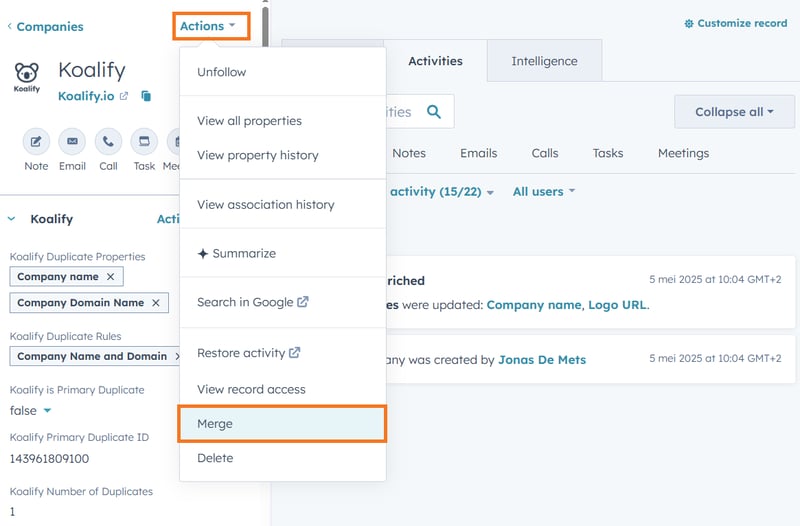
In the top left of the company page, click Actions → Merge.
-
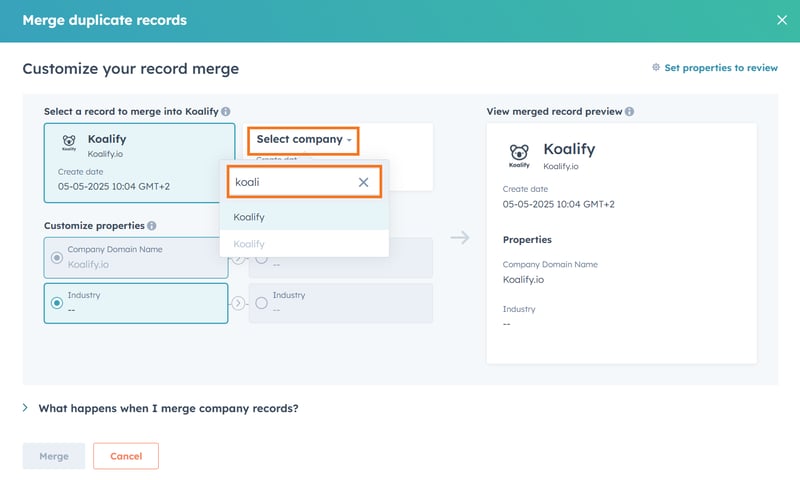
Click Select company → search for the duplicate company → choose the company you want to merge.
-
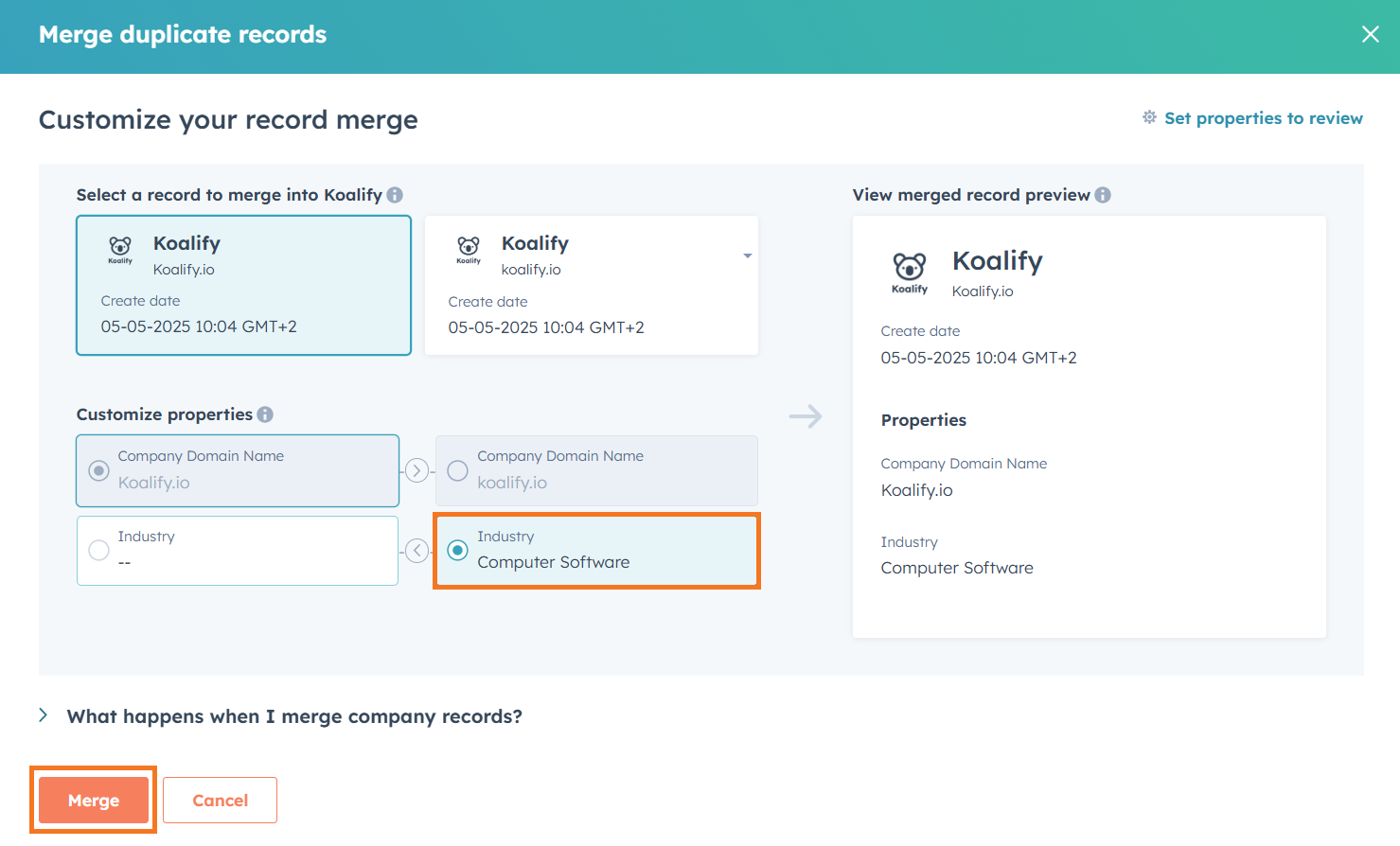
Choose the property values you'd like to retain.
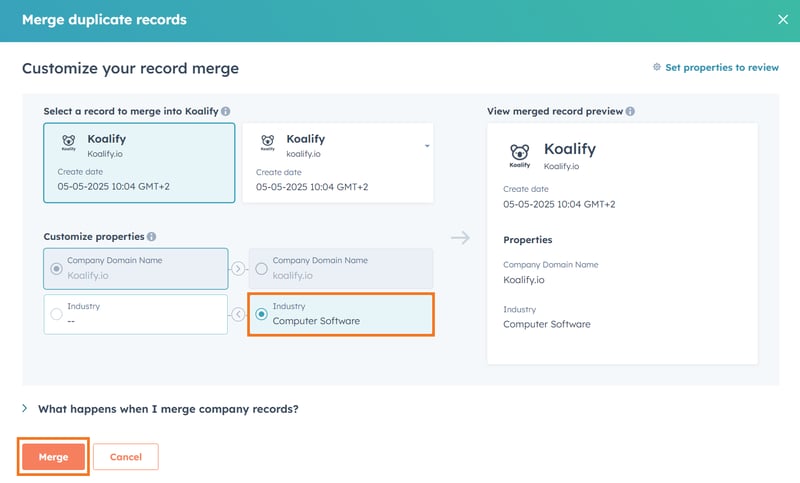
- Click Merge to dedupe the company.
✅ Pros:
-
Simple and fast for individual merges
-
You choose which property values to keep
❌ Cons:
-
Time-consuming since you need at least 6 clicks per merge
-
Requires manual duplicate spotting
How to Merge Company with HubSpot's Duplicate Management Tool 🔧
If you have a Professional-tier Hub, you get access to HubSpot’s Duplicate Management tool, which scans your CRM and flags potential duplicates. While the tool helps surface potential duplicates, suggested matches aren’t always accurate, especially for companies with similar names or shared domains.
HubSpot runs a daily scan based on:
- Contacts: First Name, Last Name, Email address, IP country, Phone number, Zip Code, and Company Name.
- Companies: Company Domain Name, Company Name, Country/Region, Phone Number, and Industry.
HubSpot shows up to 2,000 duplicate companies (or 5,000 for Data Hub Pro, 10,000 for Enterprise).
Want to more options to detect duplicates? See our guide on how to find duplicates in HubSpot.
Steps:
-
Start by navigating to the duplicate management tool
-
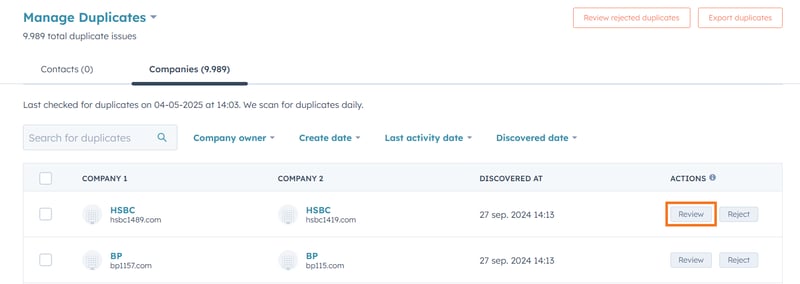
Companies → Actions → Manage Duplicates
-
-
Click Review next to a company you'd like to evaluate in the duplicate management tool
-
Choose the property values you'd like to keep.
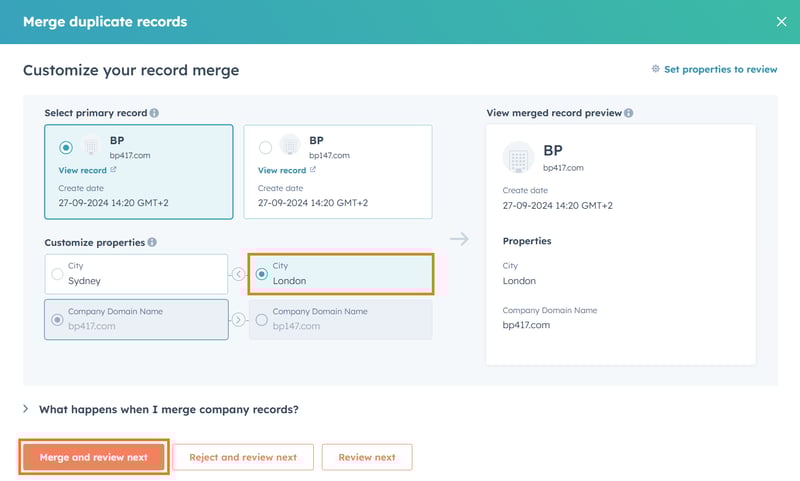
- Click Merge and review next.
✅ Pros:
-
Quick and guided
-
Scans your entire CRM automatically
- You control which data to keep after the companies are merged
❌ Cons:
-
Only one company pair can be merged at a time
-
Suggestions may not always be accurate, so manual review is needed
-
Limited to contact and company deduplication
How to Bulk Merge Companies in HubSpot with the Duplicate Management Tool 🛠️
If you're using Data Hub Professional or Enterprise, you can speed up cleanup by using the Duplicate Management tool to bulk merge up to 50 companies at a time.
Want to automate deduplication across all record types? Check out our full post on bulk merging HubSpot duplicates.
Steps:
-
Start by navigating to the duplicate management tool
-
Companies → Actions → Manage Duplicates
- Data Management → Number of Duplicates → Switch to the Companies tab
-
-
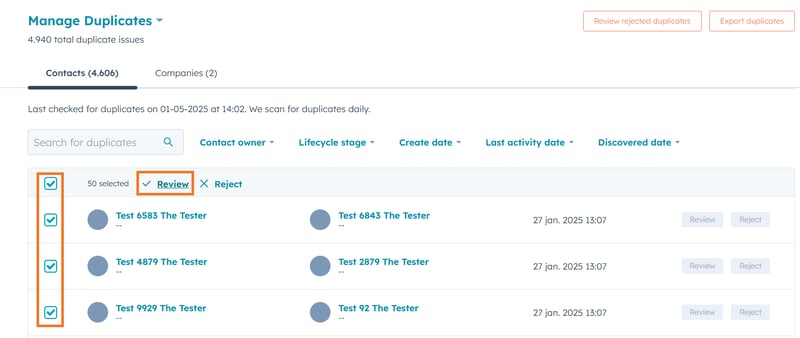
Use the checkboxes to select up to 50 duplicate companies, then click Review.
-
Choose your merge criteria to determine which companies should be the primary duplicate.
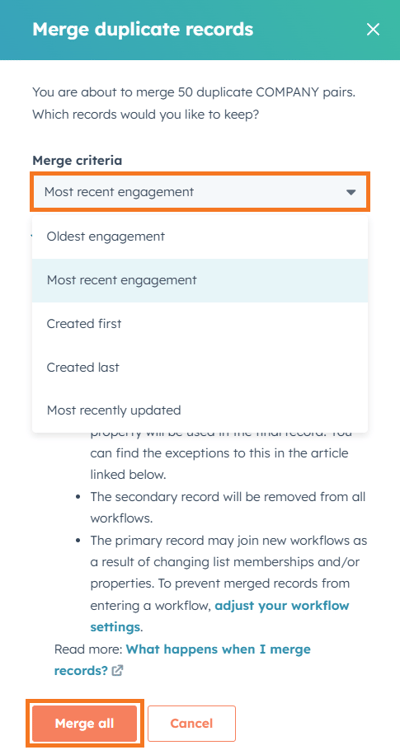
- Click Merge All to complete the bulk merge.
✅ Pros:
-
Speeds up deduplication
-
Merge up to 50 companies at once
❌ Cons:
-
Duplicate suggestions may be inaccurate, so you may accidentally merge unrelated records
-
Limited control over which property values are retained (5 options for selecting the primary)
-
Only available with Data Hub Pro or Enterprise
How to Merge HubSpot Companies Using Koalify CRM Cards🖼️
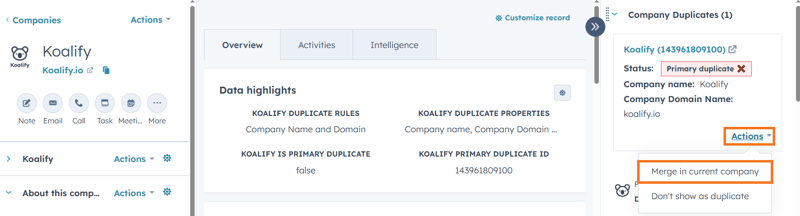
Use the Koalify duplicate card to quickly merge companies right from the company record, perfect for customer-facing teams who spot duplicates in real time.
Steps:
-
Start by navigating to the companies you want to merge
-
In the Koalify duplicate card, click Actions → Merge in current company
-
Confirm the company merge when prompted.

✅ Pros:
-
Duplicates are automatically suggested, no need to search manually
-
Full control over how duplicate companies are flagged and who can view them
-
Perfect for customer-facing teams engaging with active companies
-
Simple and intuitive to use
❌ Cons:
-
You can only merge one company at a time
-
Not scalable for large volumes since it’s a manual process
How to Bulk Merge HubSpot Companies with the Koalify Workflow Action 🤖
Need to clean up your database at scale? The Koalify “Merge Duplicate Company” workflow action lets you bulk merge companies, whether for a one-time cleanup or ongoing automation.
Steps:
-
Create a new company workflow to merge HubSpot companies in bulk
-
Navigate to Automations → Workflows
-
Click Create workflow and select the option From scratch
-
Choose Company-based, start with a Blank workflow and click Next

-
-
Add the "Merge Duplicate Company" action
-
Click on the ➕ plus icon to add a workflow action
-
Search for "Koalify" to find our workflow action
-
Select the Merge Duplicate Company action and click Save
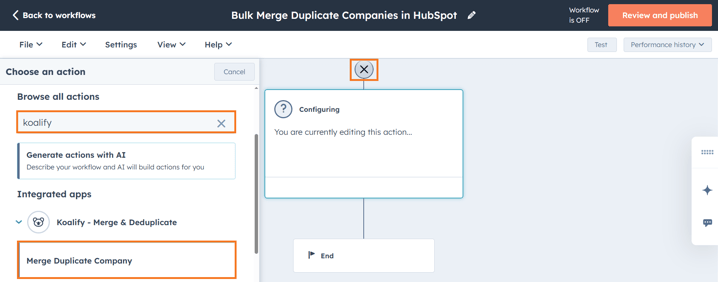
-
-
Enroll Companies in the workflow for bulk merging
-
Use manual enrollment for full control: ideal for initial bulk merges
-
Use automated triggers to automatically dedupe companies
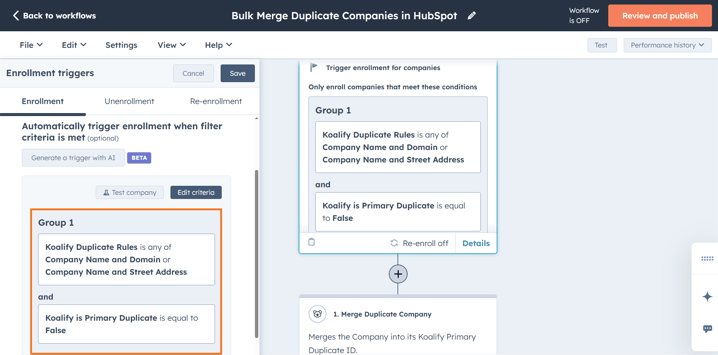
-
✅ Pros:
-
Unlimited bulk merges
-
Simple and intuitive to use
-
Full control over which duplicates get merged and are the primary
-
Great for initial clean-ups and ongoing automated deduplication
❌ Cons:
-
Requires at least one Professional-tier Hub to access workflows
Find the Best Company Merge Strategy for Your HubSpot Account
Merging duplicate companies in HubSpot is essential for maintaining sales territory integrity, accurate reporting, and smooth collaboration across teams. The best merging method depends on the volume of duplicates and how hands-on your team wants to be.
-
For smaller datasets, manual merging from the company record or using HubSpot’s Duplicate Management Tool is simple and effective.
-
For more efficient merging, Koalify’s CRM Cards and workflow automation tools make it easy to bulk merge companies with precision, whether for a one-time cleanup or ongoing deduplication.
Maintaining clean company data isn't just a technical task, it's a business advantage.
Want to eliminate duplicate companies fast without risking data integrity?
Try Koalify’s merging tools for free and keep your HubSpot data clean, organized, and ready to scale.
The table below compares the most common ways to merge companies in HubSpot based on control, risk, and scalability.
| Merge method | Best for | Level of control | Risk at scale |
|---|---|---|---|
| Manual merge (company record) | A small number of duplicate companies | Full control over property values | High |
| HubSpot Duplicate Management | Medium-sized cleanups | Moderate control | Medium |
| HubSpot bulk merge (Data Hub) | One-time bulk cleanup | Limited control (rule-based) | Medium–High |
| Koalify CRM cards | Real-time duplicate cleanup | Full control | Low |
| Koalify workflow automation | Large portals and ongoing deduplication | Full control (rule-based) | Very low |