---
title: "Dirty Data Secrets: When HubSpot's Unique Identifier Is Wrong (with Sarah Lane-Hawn)"
description: When the wrong unique identifier is baked into your HubSpot from day one, the data will never be trustworthy. Here's how one RevOps consultant fixed it.
image: https://koalify.io/hubfs/Dirty%20Data%20Secrets%20When%20HubSpots%20Unique%20Identifier%20Is%20Wrong%20%28with%20Sarah%20Lane-Hawn%29.jpg
---
[Skip to content](https://koalify.io/blog/hubspot-unique-identifier-wrong-data-architecture-rebuild#main-content)
[](https://koalify.io)
- Products
Show submenu for Products
- [Deduplication](https://koalify.io)
- [Email Validation](https://koalify.io/hubspot-email-validation)
- Pricing
Show submenu for Pricing
- [Deduplication](https://koalify.io/pricing)
- [Email Validation](https://koalify.io/hubspot-email-validation-pricing-koalify)
- [Partners](https://koalify.io/partners)
- [Blog](https://koalify.io/blog)
- Knowledge base
Show submenu for Knowledge base
- [Deduplication](https://koalify.io/knowledge-base)
- [Email Validation](https://koalify.io/email-validation-knowledge-base)
- Products
Show submenu for Products
- [Deduplication](https://koalify.io)
- [Email Validation](https://koalify.io/hubspot-email-validation)
- Pricing
Show submenu for Pricing
- [Deduplication](https://koalify.io/pricing)
- [Email Validation](https://koalify.io/hubspot-email-validation-pricing-koalify)
- [Partners](https://koalify.io/partners)
- [Blog](https://koalify.io/blog)
- Knowledge base
Show submenu for Knowledge base
- [Deduplication](https://koalify.io/knowledge-base)
- [Email Validation](https://koalify.io/email-validation-knowledge-base)


[Get Started Free](https://api.koalify.io/hubspot/install?utm_source=koalify&utm_medium=website&utm_campaign=navigation)
[HubSpot Data Quality](https://koalify.io/blog/tag/hubspot-data-quality)
# Dirty Data Secrets: When HubSpot's Unique Identifier Is Wrong (with Sarah Lane-Hawn)
[By \- Jonas,](https://koalify.io/blog/author/jonas) May 14, 2026
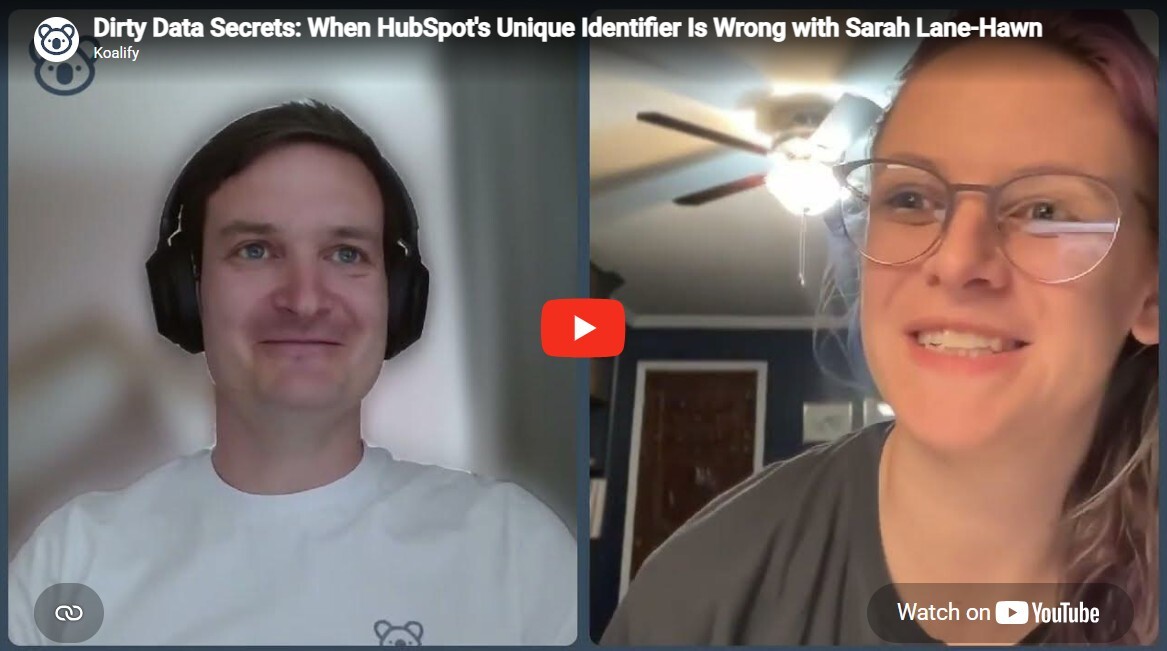
When a company's CRM pain reaches breaking point, the instinct is to clean the data. But sometimes the data isn't the problem. The architecture is.
In this episode of Dirty Data Secrets, Jonas De Mets (Co-Founder of Koalify) sat down with Sarah Lane-Hawn, RevOps strategist and consultant, to unpack a project that started as a HubSpot duplicate cleanup and quickly revealed something harder underneath: the entire database had been built on the wrong unique identifier from day one.
🎥 Watch the full episode here:
### Why the Wrong Unique Identifier Breaks Everything in HubSpot
Most HubSpot portals use company domain as the default unique identifier. For the majority of businesses, that works well enough. But for companies in industries where domain is not a reliable signal of uniqueness, it creates a structural problem that no amount of deduplication can fix.
#### The problem with domain as a default
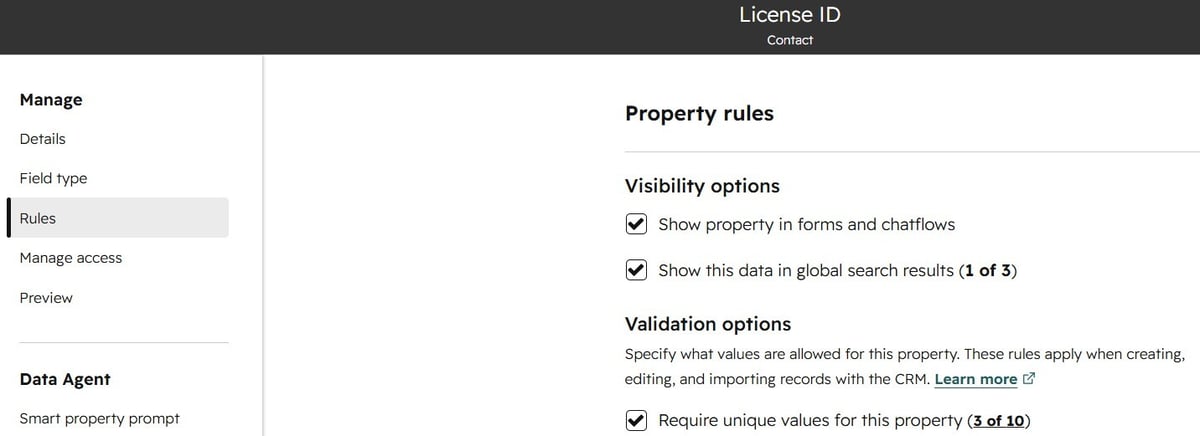
Sarah's client was a B2B company sitting on tens of thousands of records. Their industry assigns a licence ID to every contact and company: genuinely unique, and far more reliable than domain. That should have been the primary identifier from day one. It was not.
The result was a database that kept generating duplicates regardless of how often it was cleaned, because the system had no reliable way to recognise that two records referred to the same real-world entity.
Until the identifier was fixed, every cleanup was temporary.
### When Companies Finally Decide to Fix Their HubSpot Data
Sarah's clients typically find her at a moment of business change: a new funding round, a product expansion, a push into a new market. Eyes go back to the CRM. Are we getting the answers we need? Can we trust this data?
#### The breaking point pattern
What she usually finds is that the problems were always there. They just were not painful enough to prioritise.
"Something that starts as a minor annoyance starts building in how many times a week somebody is frustrated by it. Then it starts impacting updates to managers and the executive team. Then it starts impacting your actual business decision making."
That is when companies call. Not because one thing broke, but because everything aggregated to the point where working around the data was no longer an option.
### Why You Should Start With Enrichment
The first step in this project was not merging duplicates. It was figuring out whether the data could be enriched reliably enough to support a new architecture.
#### Evaluating enrichment integrations properly
Sarah evaluated the data providers that work in this industry and assessed not just whether an integration existed, but how it worked at the detail level: which fields sync, how often, which HubSpot object types are covered, and who owns the association logic.
"We think about integration at the top level. If it integrates, great. But from a data architecture perspective, it is how does it integrate, at what level, how often is it updated, and how do those object relationships change?"
The decision on which enrichment provider to use was driven entirely by which one could sustain the architecture long-term, not just fix the current state.
### How to Build HubSpot Association Hierarchy Logic
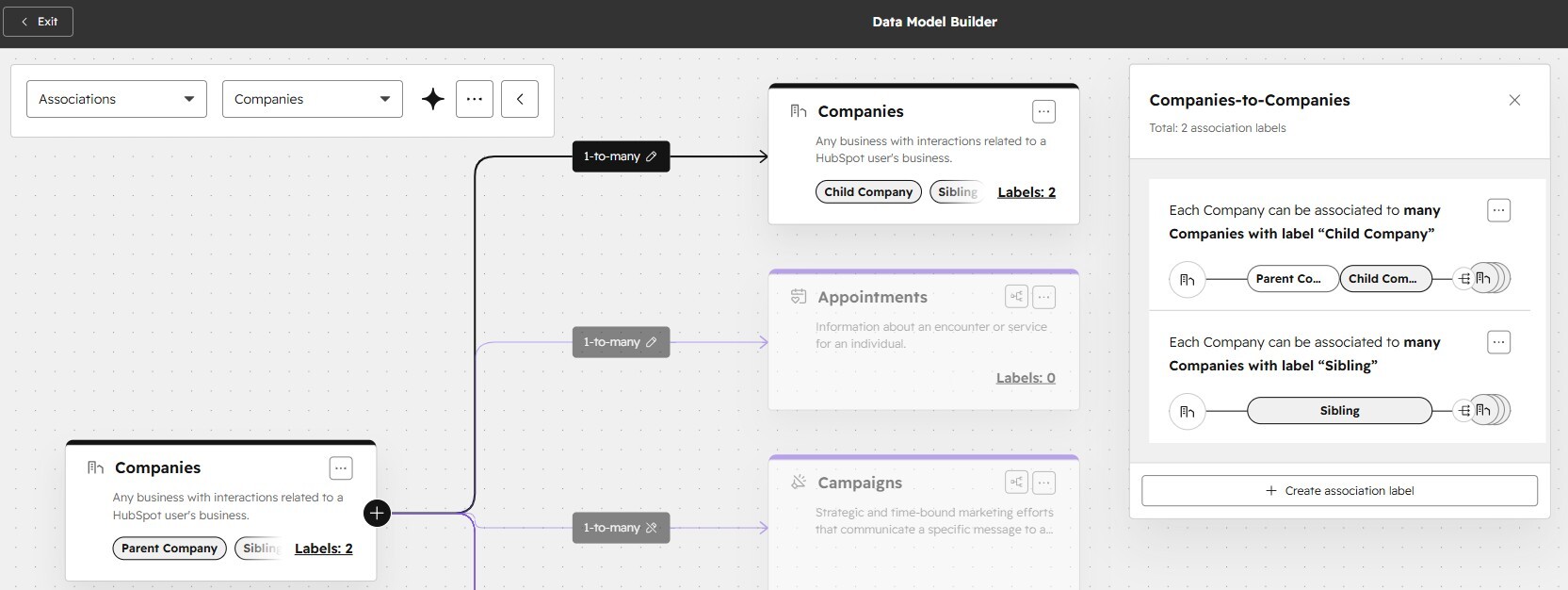
Once the licence IDs were in place at both contact and company level, the next challenge was associations. A single contact might be connected to multiple companies. A company might sit under a parent. HubSpot needs rules for which association takes priority, and in most industries there is no default answer.
#### Defining the right hierarchy for your use case
Sarah worked through the client's specific use case: how are you engaging with these people, and how much does it matter which company association you are referencing for outreach, sequencing, and reporting? From that, she built a hierarchy: daughter company first, then parent company, with each layer checked for uniqueness before moving to the next.
"Association logic is one of those things that just happens and you can see what company people are at. But when there is complexity of a person pointing to multiple companies, actually building that association architecture takes time to figure out."
This is something most HubSpot users never think about deliberately until it starts causing problems in workflows, reporting, or lead routing.
### Bulk Matching at Scale: How to Handle Records You Cannot Fully Verify
With the architecture defined, the team needed to retrospectively apply licence IDs to a database where most existing records had none. The enrichment provider ran a matching process and returned results with confidence scores. Sarah imported those results as new custom fields in HubSpot, then used workflows to sort records into three groups:
#### The three-bucket approach to bulk matching
1. High confidence: accept and map the licence ID
2. Low confidence: retain existing data and do not overwrite
3. Uncertain: flag for manual review, prioritised by business relevance
"You will never get perfect matching criteria in bulk. But when you are dealing with 20, 30, 40,000 records, you do not have time to look through all of them. So you have got to do something."
Known customers and contacts in active sales conversations were reviewed first. Everything else joined the queue without blocking the rebuild from moving forward. Getting to 90 or 95% accuracy across a large database is a meaningful improvement even if it is not perfect.
### The HubSpot Unique Value Field: An Underused Integration Guardrail
One of the most practical takeaways from this episode is a HubSpot feature that most users overlook: the unique value field setting.
#### How it protects your integrations
When you mark a custom property as requiring a unique value, HubSpot enforces that no two records can hold the same value in that field. Sarah applied this to the licence ID field at the company level. The effect is significant: when an integration comes in looking for a matching record to sync to, it can only ever find one. Even if the rest of the database is not fully clean, the integration cannot write to multiple records at once.
"I had never done that before for the explicit purpose of integration cleanliness. But it made a lot of sense. If you require a unique value, the things syncing in are always going to one place."
Most HubSpot users know this setting as a way to prevent duplicate email addresses on contact records. Using it deliberately to protect integration integrity is a different application worth keeping in mind whenever you are building a data architecture that relies on an external system syncing to HubSpot.
### Cross-Property Duplicate Matching in HubSpot
One limitation Sarah kept running into was looking across fields for matches. If one contact's primary email matches another contact's secondary email, HubSpot's native duplicate detection will not surface that as a potential match because it compares field to field, not value to value.
#### How Koalify handles cross-property matching
She used Claude to run those comparisons externally, which identified matches and hierarchy decisions that would not have been visible inside HubSpot.
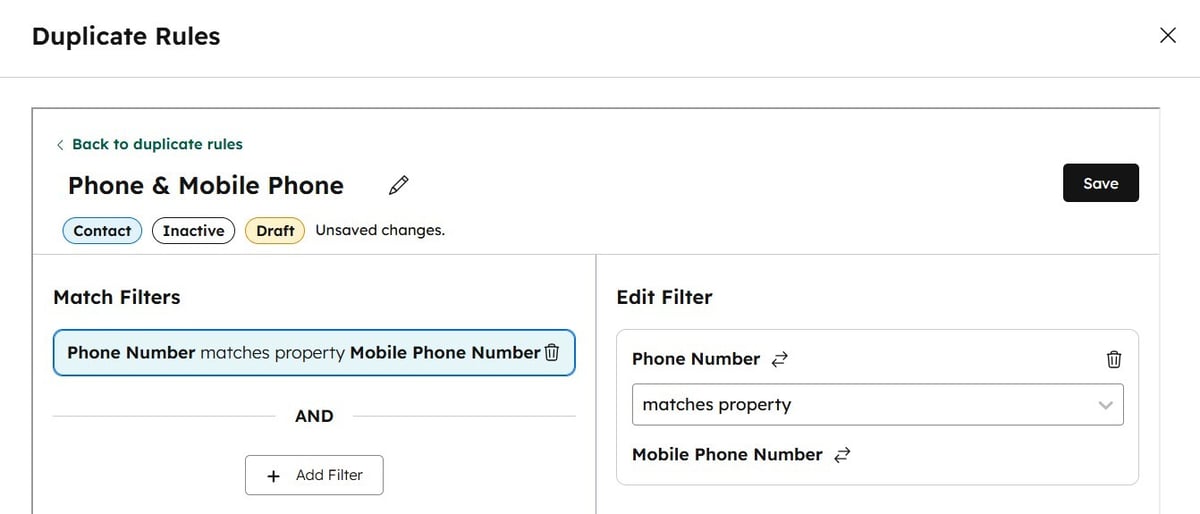
Koalify handles cross-property matching natively. Duplicate rules can be configured to compare the default email field against a secondary email field, or mobile phone against direct phone. This is a common pattern in databases that have been imported from multiple sources over time, where contacts may have been created under different email addresses at different points.
### What a Clean Foundation Actually Unlocks
The business impact of this project was not immediately quantifiable in a single headline number.
But what it unblocked was significant.
#### From broken MQL logic to a functioning lifecycle
Before the rebuild, the MQL process required a demographic fit that almost no contacts in the database ever qualified for, not because the leads were wrong but because the data to assess fit simply was not there. Marketing was effective. Sales was effective. None of it was being reflected in lifecycle changes or historical reporting.
After: a clean conversion path, reliable demographic data, and the ability to sequence and nurture based on who contacts actually are, not just that they exist.
"Much cleaner lifecycle, easier to sequence and nurture, and increased pipeline because of that. It will be a very new world for them."
### Tools Are Just Tools
The broader point Sarah made at the end of the conversation applies to every messy HubSpot project, not just architecture rebuilds.
#### The craftsmanship behind clean data
"Out of the box, it is tools. Tools are great. But you have to know how to use them, you have to have the craftsmanship to put it together correctly, and you have to know when external resources need to be brought in."
Data architecture, like any data project, is not just a technical problem. It is a sequencing problem. Enrichment before deduplication. Architecture before automation. Foundation before reporting.
And sometimes that means admitting the foundation was never quite right, and starting from there.
### Frequently Asked Questions
#### What is a unique identifier in HubSpot and why does it matter?
A unique identifier is a property value that distinguishes one record from all others. HubSpot uses email address as the default unique identifier for contacts and domain for companies. If neither of those is reliable for your industry or business model, your CRM will generate duplicates regardless of how often you clean it, because the system has no way to recognise that two records refer to the same entity.
#### When should you use a custom unique identifier instead of domain in HubSpot?
Any time domain is not a reliable signal of uniqueness. Common examples include industries with regulated licence IDs, businesses that deal with sole traders or individuals who operate under multiple domains, companies with complex subsidiary structures, or databases where contacts frequently change employer and therefore email domain.
#### What is cross-property duplicate matching in HubSpot?
Cross-property matching detects duplicates by comparing values across different fields, rather than comparing the same field on two records. For example, checking whether contact A's primary email matches contact B's secondary email. HubSpot's native deduplication does not support this. Koalify does.
#### How do you handle bulk matching when you cannot verify every record?
Sort records into three groups based on confidence: accept, reject, and manual review. Import confidence scores from your enrichment provider as custom HubSpot fields, use workflows to act on the high-confidence groups automatically, and prioritise the manual review queue by business relevance. You will not achieve perfect accuracy at scale, but a structured approach gets you to a reliable working state without blocking everything else.
#### What does HubSpot's unique value field setting do?
It enforces that no two records can hold the same value in a given property field. This is useful for preventing duplicate contacts sharing the same email, but it is also a powerful integration guardrail: if an external system syncs to HubSpot using a unique field as the match key, it will always resolve to exactly one record.
###### Category
- [HubSpot Data Quality](https://koalify.io/blog/tag/hubspot-data-quality)
- [HubSpot Email Validation](https://koalify.io/blog/tag/hubspot-email-validation)
- [HubSpot Revenue Operations](https://koalify.io/blog/tag/hubspot-revenue-operations)
- [HubSpot Integration Duplicates](https://koalify.io/blog/tag/hubspot-integration-duplicates)
- [HubSpot Associations](https://koalify.io/blog/tag/hubspot-associations)
- [HubSpot Deduplication](https://koalify.io/blog/tag/hubspot-deduplication)
###### Popular Post
- [HubSpot best practices for contacts that leave a company](https://koalify.io/blog/hubspot-best-practices-for-contacts-that-leave-a-company)
- [How to Bulk Merge HubSpot Duplicates: Contacts, Companies, Deals and More](https://koalify.io/blog/how-to-bulk-merge-hubspot-duplicates-contacts-companies-more)
- [How to Merge Companies in HubSpot (Safely, Manually or in Bulk)](https://koalify.io/blog/how-to-merge-companies-in-hubspot-manual-or-in-bulk)
- [HubSpot Deduplication: How to Find, Manage, and Remove Duplicates in HubSpot](https://koalify.io/blog/hubspot-deduplication-the-ultimate-guide-to-zero-duplicates-in-hubspot)
- [How to Merge Duplicate Contacts in HubSpot Without Losing Data](https://koalify.io/blog/how-to-merge-contacts-in-hubspot-manual-or-in-bulk)
### Similar Blogs
#### [Deduplicate first, then enrol the clean contact in a HubSpot sequence](https://koalify.io/blog/deduplicate-first-then-enrol-the-clean-contact-in-a-hubspot-sequence)
By [Jonas](https://koalify.io/blog/author/jonas) 23 July 2026
If you automate outreach in HubSpot, duplicate contacts break the process quietly.
[READ MORE](https://koalify.io/blog/deduplicate-first-then-enrol-the-clean-contact-in-a-hubspot-sequence)
#### [Dirty Data Secrets: Why Duplicate Data Breaks HubSpot (with Ryan Gunn)](https://koalify.io/blog/dirty-data-secrets-why-duplicate-data-breaks-hubspot-with-ryan-gunn)
By [Jonas](https://koalify.io/blog/author/jonas) 17 December 2025
Duplicate data is one of the most underestimated problems in HubSpot—and it’s quietly breaking...
[READ MORE](https://koalify.io/blog/dirty-data-secrets-why-duplicate-data-breaks-hubspot-with-ryan-gunn)

#### [How Karin Tamir Fixed HubSpot Duplicate Chaos from Complex Integrations (with Koalify)](https://koalify.io/blog/how-karin-tamir-fixed-hubspot-duplicate-chaos-from-complex-integrations-with-koalify)
By [Jonas](https://koalify.io/blog/author/jonas) 31 March 2025
[READ MORE](https://koalify.io/blog/how-karin-tamir-fixed-hubspot-duplicate-chaos-from-complex-integrations-with-koalify)
## Koalify
HubSpot deduplication & email validation
-
-
[Review Koalify in the HubSpot Marketplace](https://app-eu1.hubspot.com/l/marketplace/listing/koalify-io/write-review?eco_review_source=external-button)
[](https://trust.koalify.io/)
[](https://trust.koalify.io/)
## Deduplication
[Deduplication for HubSpot](https://koalify.io)
[Pricing](https://koalify.io/pricing)
[Knowledge Base](https://koalify.io/knowledge-base)
[Terms of Service](https://koalify.io/terms-of-service)
[Data Processing Addendum](https://koalify.io/data-processing-addendum)
[HubSpot Deduplication Tools](https://koalify.io/best-hubspot-deduplication-apps)
[vs. HubSpot Native](https://koalify.io/compare/koalify-vs-hubspot-native-deduplication)
[vs. Insycle](https://koalify.io/compare/koalify-vs-insycle-hubspot-deduplication)
[vs. Dedupely](https://koalify.io/compare/koalify-vs-dedupely)
[HubSpot Deduplication Guide](https://koalify.io/blog/hubspot-deduplication-the-ultimate-guide-to-zero-duplicates-in-hubspot)
[Merge HubSpot Contacts](https://koalify.io/blog/how-to-merge-contacts-in-hubspot-manual-or-in-bulk)
[Merge HubSpot Companies](https://koalify.io/blog/how-to-merge-companies-in-hubspot-manual-or-in-bulk)
[Merge HubSpot Deals](https://koalify.io/blog/how-to-merge-deals-in-hubspot-manual-or-in-bulk)
[Bulk Merge HubSpot](https://koalify.io/blog/how-to-bulk-merge-hubspot-duplicates-contacts-companies-more)
## Email Validation
[Email Validation for HubSpot](https://koalify.io/hubspot-email-validation)
[Pricing](https://koalify.io/hubspot-email-validation-pricing-koalify)
[Knowledge Base](https://koalify.io/email-validation-knowledge-base)
[Terms of Service](https://koalify.io/terms-of-service-email-validation)
[Data Processing Addendum](https://koalify.io/data-processing-addendum-email-validation)
[HubSpot Email Validation Tools](https://koalify.io/best-email-validation-tools-for-hubspot)
[vs. NeverBounce](https://koalify.io/compare/koalify-vs-neverbounce)
[vs. ZeroBounce](https://koalify.io/compare/koalify-vs-zerobounce)
[vs. Kickbox](https://koalify.io/compare/koalify-vs-kickbox)
[HubSpot Email Validation Guide](https://koalify.io/hubspot-email-validation-guide)
[HubSpot Email Deliverability](https://koalify.io/hubspot-email-deliverability)
[HubSpot Bounce Rate](https://koalify.io/hubspot-bounce-rate)
## Company
[Partners](https://koalify.io/partners)
[Blog](https://koalify.io/blog)
[Trust Center](https://trust.koalify.io/)
[Security](https://koalify.io/security)
© 2026 Koalify. All rights reserved.
```json
{
"@context" : "https://schema.org",
"@type" : "BlogPosting",
"author" : {
"@type" : "Person",
"name" : "Jonas",
"url" : "https://koalify.io/blog/author/jonas"
},
"dateModified" : "2026-05-14T09:12:58.041Z",
"datePublished" : "2026-05-14T09:12:19.000Z",
"headline" : "Dirty Data Secrets: When HubSpot's Unique Identifier Is Wrong (with Sarah Lane-Hawn)",
"image" : [ "https://koalify.io/hubfs/Dirty%20Data%20Secrets%20When%20HubSpots%20Unique%20Identifier%20Is%20Wrong%20%28with%20Sarah%20Lane-Hawn%29.jpg" ],
"mainEntityOfPage" : {
"@id" : "https://koalify.io/blog/hubspot-unique-identifier-wrong-data-architecture-rebuild",
"@type" : "WebPage"
},
"publisher" : {
"@type" : "Organization",
"logo" : {
"@type" : "ImageObject",
"url" : "https://koalify.io/hubfs/koalify_rectangle_100px.png"
},
"name" : "Koalify"
}
}
```