---
title: How Revunami Merged 275,000 Duplicate Contacts for a Multi-Brand B2C Client
description: Hope Adair from Revunami shares how she merged 275,000 duplicate HubSpot contacts for a multi-brand B2C client without losing lead routing integrity.
image: https://koalify.io/hubfs/How%20I%20Fixed%20Your%20Data%20Hope%20ADair.jpg
---
[Skip to content](https://koalify.io/blog/how-revunami-merged-duplicate-hubspot-contacts-multi-brand#main-content)
[](https://koalify.io)
- Products
Show submenu for Products
- [Deduplication](https://koalify.io)
- [Email Validation](https://koalify.io/hubspot-email-validation)
- Pricing
Show submenu for Pricing
- [Deduplication](https://koalify.io/pricing)
- [Email Validation](https://koalify.io/hubspot-email-validation-pricing-koalify)
- [Partners](https://koalify.io/partners)
- [Blog](https://koalify.io/blog)
- Knowledge base
Show submenu for Knowledge base
- [Deduplication](https://koalify.io/knowledge-base)
- [Email Validation](https://koalify.io/email-validation-knowledge-base)
- Products
Show submenu for Products
- [Deduplication](https://koalify.io)
- [Email Validation](https://koalify.io/hubspot-email-validation)
- Pricing
Show submenu for Pricing
- [Deduplication](https://koalify.io/pricing)
- [Email Validation](https://koalify.io/hubspot-email-validation-pricing-koalify)
- [Partners](https://koalify.io/partners)
- [Blog](https://koalify.io/blog)
- Knowledge base
Show submenu for Knowledge base
- [Deduplication](https://koalify.io/knowledge-base)
- [Email Validation](https://koalify.io/email-validation-knowledge-base)


[Get Started Free](https://api.koalify.io/hubspot/install?utm_source=koalify&utm_medium=website&utm_campaign=navigation)
[HubSpot Data Quality](https://koalify.io/blog/tag/hubspot-data-quality)
# How Revunami Merged 275,000 Duplicate Contacts for a Multi-Brand B2C Client
[By \- Jonas,](https://koalify.io/blog/author/jonas) May 20, 2026

When Hope Adair and her team at Revunami took on a large multi-brand B2C client, they ran into a deduplication problem that doesn't show up in most RevOps playbooks.
The client had just migrated into HubSpot. Four million contacts. Multiple brands. A legacy CRM migration still in progress, with a Shopify move running at the same time. The individual pieces of their data were largely clean. The problem was what happened when you put them all together.
Sales reps were calling the same lead twice. Workflows were running on records that had counterparts sitting elsewhere in the CRM. And because the client operated multiple brands, even the question of what counted as a duplicate was complicated.
The question wasn't just how to clean the data. It was: how do you run a deduplication project when the stakeholders are nervous, the data is enormous, and getting it wrong in front of a sales team that already doesn't fully trust the CRM would set everything back?
🎥 **Watch the full episode below:**
## The problem: duplicate records entering a live lead routing system
The most visible symptom was also the most damaging one. When a duplicate contact slipped through into lead assignment, a rep would get assigned a lead and call them, only to find out someone else was already in conversation with that person.
Bad experience for the customer. Wasted call for the rep. And exactly the kind of thing that makes a sales team stop trusting the CRM.
Beyond that, there were the less visible costs. Reports were off. Workflow logic was running on incomplete records. And with AI and automation increasingly part of the client's stack, bad data wasn't just a hygiene issue, it was adding real cost. As Hope put it: "With AI, such a big cost to bad data is that it's costing you more credits and many more prompts to try to get information, because you have to keep clarifying when the data is a little bit of a mess."
The deduplication problem wasn't contained to the CRM. It was touching everything downstream.

## The fix: a staged, brand-by-brand rollout built around trust
Before a single record was merged, [Revunami](https://revunami.com/) spent time mapping out rules and building internal confidence. The client had one sales leader who was — in Hope's words — "very on top of all changes in HubSpot and very quick to notice anything that's wrong with the data." Passing her test was the unofficial benchmark.
The approach had three layers.
### Tiered rules by confidence
Revunami started with the combinations they were most certain about: first name, last name, and normalised phone number. High confidence. Clear criteria. If a record matched on all three, it was almost certainly a duplicate. Those went through the automated merge workflow first. From there, they worked down to fuzzier matches: fuzzy email matching, records that shared some attributes but not all. Those required more scrutiny, not less automation.
### A brand-by-brand rollout
Rather than running the deduplication across the entire database at once, they started with a single brand. Cleaned it out. Waited for the stakeholders on that brand to confirm everything looked right. Then moved to the next. Cross-brand contact, the most complex case, where the same person might legitimately belong to multiple brands — came last, once the pool was smaller and internal confidence was higher.
### Transparent workflow tracking
Every cohort of records being merged was run through a dedicated HubSpot workflow with manual enrolment, scoped by both brand and rule. That meant every merge was logged, visible, and attributable. "In the past, merging was kind of a black box for a lot of users," Hope noted. The transparency wasn't just good practice it was part of how trust got built.
## The configuration: merge rules that append rather than overwrite
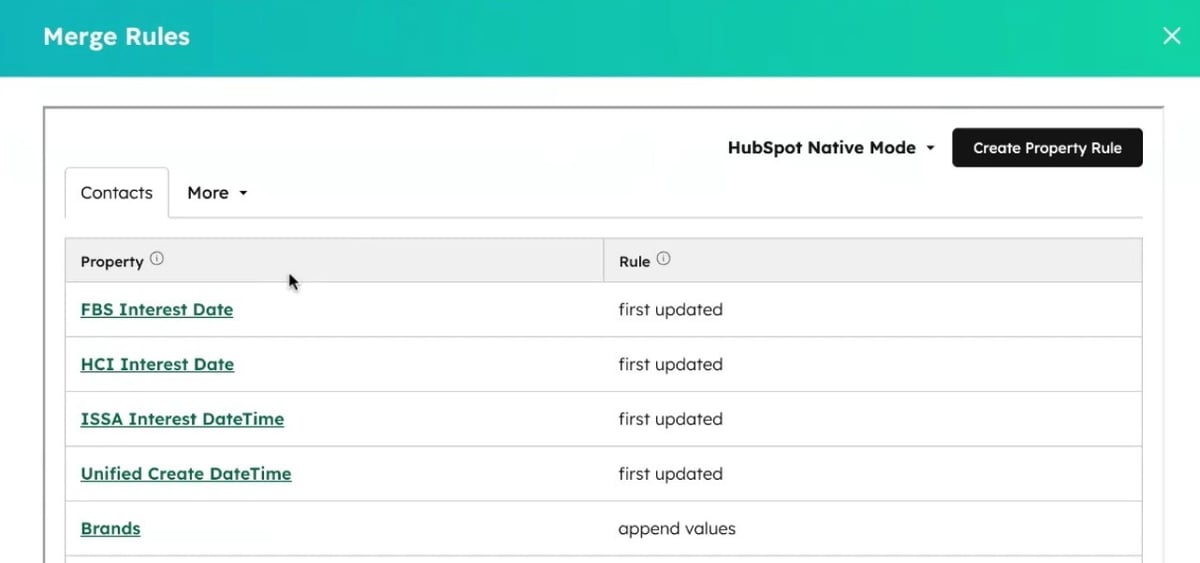
When you merge two records in HubSpot, the default behaviour is to retain the primary record's property values and discard the secondary's. For a single-brand business, that's usually fine. For a multi-brand client where the same contact might have meaningful data attached to each brand: different interest dates, different engagement history, different brand associations, overwriting is a problem.
[Koalify's merge rules](https://koalify.io/knowledge-base/how-to-create-custom-merge-rules-in-hubspot-with-koalify) let you define property-level behaviour for each merge. For this client, brand-related fields were set to append rather than overwrite. A contact who had engaged with Brand A and Brand B would come out of the merge with both values retained, not just the primary record's version.
The same logic applied to first-touch attribution data. "They always want to keep the first \[interest date\] for those, because that's what they're using for their first touch attribution," Hope explained. Any field used for attribution reporting was configured to retain the earliest value, so the merge didn't corrupt the reporting foundation the client had built.
That kind of configuration detail which properties to keep, which to append, which to discard is often where deduplication projects either protect data quality or quietly damage it. Getting it right required understanding what the client's downstream reporting actually relied on before touching anything.
## The speed-to-lead challenge: quality versus immediacy
Once the backlog was cleared, the next challenge was setting up ongoing prevention real-time deduplication that would catch new duplicates as they came in through form submissions.
For most HubSpot portals, that's straightforward. A new contact is created, Koalify flags it as a probable duplicate, a workflow merges it, the clean record moves through lead routing.
For this client, the complication was speed-to-lead. They ran a high-volume B2C operation where lead response time was measured in seconds. Any delay in the routing process was noticeable and unwelcome.
Revunami's solution was to branch the workflow. If Koalify identified an inbound lead as a probable duplicate, it was pulled out of the standard routing flow, deduped, and then re-entered into the lead router this time as a merged record, with an existing owner already attached. Reps who were already working a contact would get the new activity routed back to them automatically.
The delay for duplicate records was a couple of minutes. For everything else, nothing changed.
Getting internal sign-off on that tradeoff required some advocacy. "We found some champions internally who were like, no, the quality is more important here," Hope said. The key framing: a delay of two minutes on a duplicate record is better than a rep calling the wrong person at all.
## Results: 275,000 records merged, cleaner pipeline, lower billing
After 275,000 records merged in the initial cleanup pass, the impacts were clearest where the original problem had been most visible.
Sales reps stopped double-calling. The manual double-checking that had become part of the pre-call routine (scanning for duplicates before dialling out) largely disappeared. The sales leader who had been the unofficial quality benchmark throughout the project had no complaints. For a team that tracks every change to the CRM, that silence was the result.
With fewer duplicate contact records in the system, the client's HubSpot billing dropped too. Duplicate contacts inflate your [marketing contact count](https://koalify.io/blog/how-to-reduce-marketing-contacts-in-hubspot) directly every deduplicated record is one fewer contact you're paying for. At four million records, even a modest deduplication rate translates to a meaningful reduction in plan costs.
The longer-term benefit is the one that's harder to quantify but more important. A CRM that reps trust is the foundation everything else is built on. Lead scoring, personalised sequences, AI-assisted outreach, none of it works reliably if the records underneath are duplicated and fragmented. The deduplication work wasn't the headline deliverable. It was what made the headline deliverables possible.
## Lessons from Hope's approach
### Build trust before you build speed
The technical setup took two weeks. The internal confidence-building took six months. That ratio isn't a failure of project management it's an honest reflection of how long it takes to get stakeholders comfortable enough to let you merge their data at scale. "Once you do that and you can't get the trust back if it doesn't go well," Hope said. Moving slowly at the start is what made the fast cleanup at the end possible.
### Test in production, not just sandbox
Sandbox testing tells you whether the logic is correct. Production testing tells you how records actually move through your system which workflows trigger post-merge, which fields update, which edge cases surface when real data is involved. For a complex org with custom code and multi-step workflows, that distinction matters.
### Think about what happens after the merge
When you merge two records, the resulting record may have new or updated property values. Those values can trigger other workflows. If you haven't mapped that in advance, you can end up with unintended enrolments, status changes, or notification sends. Audit your workflows before you merge at scale, not after.
### Transparency is a feature
Running merges through a HubSpot workflow with logged enrolment, rather than through a bulk action that leaves no trace, gave the client full visibility into what had been done and why. For a stakeholder who's nervous about data changes, being able to show them exactly which records went through and what happened to them is often the thing that unlocks the next phase of the project.
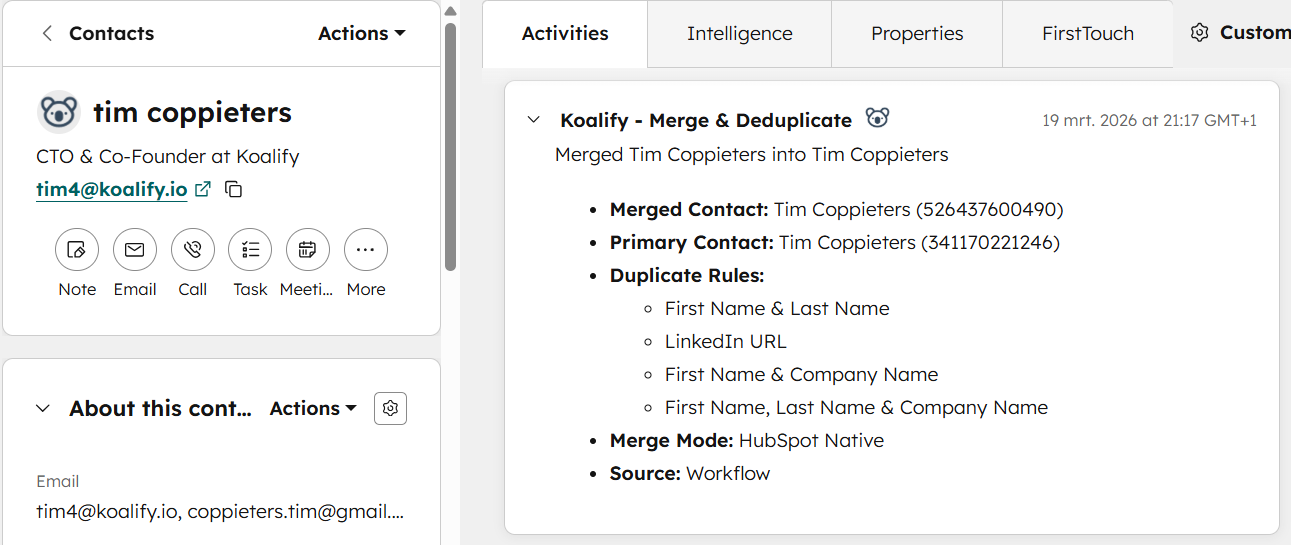
Revunami is a digital strategy and RevOps agency based in the US. If you're dealing with a similar deduplication challenge — a large backlog, a multi-brand portal, or an integration that keeps generating new duplicates — that's exactly the problem Koalify is built for. If you're a HubSpot Solution Partner, the [Koalify partner programme](https://koalify.io/partners) covers all object types and includes a free partner account.
###### Category
- [HubSpot Data Quality](https://koalify.io/blog/tag/hubspot-data-quality)
- [HubSpot Email Validation](https://koalify.io/blog/tag/hubspot-email-validation)
- [HubSpot Revenue Operations](https://koalify.io/blog/tag/hubspot-revenue-operations)
- [HubSpot Integration Duplicates](https://koalify.io/blog/tag/hubspot-integration-duplicates)
- [HubSpot Associations](https://koalify.io/blog/tag/hubspot-associations)
- [HubSpot Deduplication](https://koalify.io/blog/tag/hubspot-deduplication)
###### Popular Post
- [HubSpot best practices for contacts that leave a company](https://koalify.io/blog/hubspot-best-practices-for-contacts-that-leave-a-company)
- [How to Bulk Merge HubSpot Duplicates: Contacts, Companies, Deals and More](https://koalify.io/blog/how-to-bulk-merge-hubspot-duplicates-contacts-companies-more)
- [How to Merge Companies in HubSpot (Safely, Manually or in Bulk)](https://koalify.io/blog/how-to-merge-companies-in-hubspot-manual-or-in-bulk)
- [HubSpot Deduplication: How to Find, Manage, and Remove Duplicates in HubSpot](https://koalify.io/blog/hubspot-deduplication-the-ultimate-guide-to-zero-duplicates-in-hubspot)
- [How to Merge Duplicate Contacts in HubSpot Without Losing Data](https://koalify.io/blog/how-to-merge-contacts-in-hubspot-manual-or-in-bulk)
### Similar Blogs

#### [How Jasper Meurs Fixed Duplicate HubSpot Companies in Higher Education (with Koalify)](https://koalify.io/blog/how-jasper-meurs-fixed-duplicate-hubspot-companies-in-higher-education-with-koalify)
By [Jonas](https://koalify.io/blog/author/jonas) 7 October 2025
In higher education, subdomains are everywhere:`math.university.edu`, `engineering.university.edu`, `...`
[READ MORE](https://koalify.io/blog/how-jasper-meurs-fixed-duplicate-hubspot-companies-in-higher-education-with-koalify)

#### [How Karin Tamir Fixed HubSpot Duplicate Chaos from Complex Integrations (with Koalify)](https://koalify.io/blog/how-karin-tamir-fixed-hubspot-duplicate-chaos-from-complex-integrations-with-koalify)
By [Jonas](https://koalify.io/blog/author/jonas) 31 March 2025
[READ MORE](https://koalify.io/blog/how-karin-tamir-fixed-hubspot-duplicate-chaos-from-complex-integrations-with-koalify)

#### [How Pyxis Growth Partners Cleaned 300,000 Duplicate HubSpot Contacts from 3 Phone Integrations](https://koalify.io/blog/how-pyxis-growth-partners-cleaned-300000-duplicate-hubspot-contacts-from-3-phone-integrations)
By [Jonas](https://koalify.io/blog/author/jonas) 29 October 2025
When three different phone systems, two call tracking tools, and over 20 brands all push leads into...
[READ MORE](https://koalify.io/blog/how-pyxis-growth-partners-cleaned-300000-duplicate-hubspot-contacts-from-3-phone-integrations)
## Koalify
HubSpot deduplication & email validation
-
-
[Review Koalify in the HubSpot Marketplace](https://app-eu1.hubspot.com/l/marketplace/listing/koalify-io/write-review?eco_review_source=external-button)
[](https://trust.koalify.io/)
[](https://trust.koalify.io/)
## Deduplication
[Deduplication for HubSpot](https://koalify.io)
[Pricing](https://koalify.io/pricing)
[Knowledge Base](https://koalify.io/knowledge-base)
[Terms of Service](https://koalify.io/terms-of-service)
[Data Processing Addendum](https://koalify.io/data-processing-addendum)
[HubSpot Deduplication Tools](https://koalify.io/best-hubspot-deduplication-apps)
[vs. HubSpot Native](https://koalify.io/compare/koalify-vs-hubspot-native-deduplication)
[vs. Insycle](https://koalify.io/compare/koalify-vs-insycle-hubspot-deduplication)
[vs. Dedupely](https://koalify.io/compare/koalify-vs-dedupely)
[HubSpot Deduplication Guide](https://koalify.io/blog/hubspot-deduplication-the-ultimate-guide-to-zero-duplicates-in-hubspot)
[Merge HubSpot Contacts](https://koalify.io/blog/how-to-merge-contacts-in-hubspot-manual-or-in-bulk)
[Merge HubSpot Companies](https://koalify.io/blog/how-to-merge-companies-in-hubspot-manual-or-in-bulk)
[Merge HubSpot Deals](https://koalify.io/blog/how-to-merge-deals-in-hubspot-manual-or-in-bulk)
[Bulk Merge HubSpot](https://koalify.io/blog/how-to-bulk-merge-hubspot-duplicates-contacts-companies-more)
## Email Validation
[Email Validation for HubSpot](https://koalify.io/hubspot-email-validation)
[Pricing](https://koalify.io/hubspot-email-validation-pricing-koalify)
[Knowledge Base](https://koalify.io/email-validation-knowledge-base)
[Terms of Service](https://koalify.io/terms-of-service-email-validation)
[Data Processing Addendum](https://koalify.io/data-processing-addendum-email-validation)
[HubSpot Email Validation Tools](https://koalify.io/best-email-validation-tools-for-hubspot)
[vs. NeverBounce](https://koalify.io/compare/koalify-vs-neverbounce)
[vs. ZeroBounce](https://koalify.io/compare/koalify-vs-zerobounce)
[vs. Kickbox](https://koalify.io/compare/koalify-vs-kickbox)
[HubSpot Email Validation Guide](https://koalify.io/hubspot-email-validation-guide)
[HubSpot Email Deliverability](https://koalify.io/hubspot-email-deliverability)
[HubSpot Bounce Rate](https://koalify.io/hubspot-bounce-rate)
## Company
[Partners](https://koalify.io/partners)
[Blog](https://koalify.io/blog)
[Trust Center](https://trust.koalify.io/)
[Security](https://koalify.io/security)
© 2026 Koalify. All rights reserved.
```json
{
"@context" : "https://schema.org",
"@type" : "BlogPosting",
"author" : {
"@type" : "Person",
"name" : "Jonas",
"url" : "https://koalify.io/blog/author/jonas"
},
"dateModified" : "2026-05-20T09:28:15.082Z",
"datePublished" : "2026-05-20T09:25:58.000Z",
"headline" : "How Revunami Merged 275,000 Duplicate Contacts for a Multi-Brand B2C Client",
"image" : [ "https://koalify.io/hubfs/How%20I%20Fixed%20Your%20Data%20Hope%20ADair.jpg" ],
"mainEntityOfPage" : {
"@id" : "https://koalify.io/blog/how-revunami-merged-duplicate-hubspot-contacts-multi-brand",
"@type" : "WebPage"
},
"publisher" : {
"@type" : "Organization",
"logo" : {
"@type" : "ImageObject",
"url" : "https://koalify.io/hubfs/koalify_rectangle_100px.png"
},
"name" : "Koalify"
}
}
```