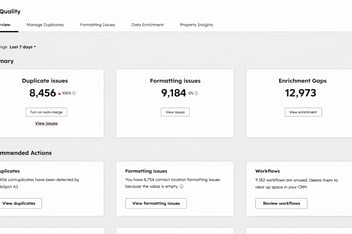


A sales rep messages you on Monday morning: the account history for one of their biggest customers has disappeared. You open the record and find it isn't gone. It's sitting inside another company, merged over the weekend by a duplicate rule that matched on a shared domain. Then you check the workflow history and realise it didn't happen once. It happened 400 times.
Your next search is probably "how do I undo a merge in HubSpot?" The honest answer is short: natively, you can't.
This post covers what HubSpot does and doesn't let you recover, why bad merges happen even in well-run portals, and how to reverse them (one at a time or in bulk) when the merge was done with Koalify.
Quick answer: HubSpot has no native unmerge feature. Once two records are merged, HubSpot can't separate them again. If the merge was done through Koalify, you can reverse it: a single record from its timeline event, or hundreds at once by enrolling the affected merges in an unmerge workflow.
Why HubSpot can't undo a merge
HubSpot's own knowledge base is clear on this: once you've merged two records, it isn't possible to unmerge them. There's no undo button, no recycle bin for the record that was merged away, and HubSpot support can't reverse it for you.
Here's what a merge does in HubSpot:
- Activities and associations from both records are combined onto one surviving record.
- Property values from the primary record win. The other record's values only survive in property history.
- Workflow enrolments are cancelled for both records.
- The secondary record stops existing as a separate record you can open.
Unmerging has been one of the most requested features in the HubSpot Community for years. HubSpot has said it's on the roadmap, but without a timeline.
Until then, the native workaround is entirely manual: create a new record, copy the old values back in from property history, and re-associate the right contacts, deals and activities one by one. That's manageable for one bad merge. It isn't manageable for 400.
.png?width=796&height=646&name=How%20to%20undo%20a%20merge%20in%20HubSpot%20(bulk%20unmerge).png)
Why merges go wrong at scale (even when your rules are good)
Our customers merge thousands of duplicates, often through workflows that run in the background without anyone watching. At that volume, a small error rate still adds up. If 0.5% of 10,000 merges are wrong, that's 50 records someone has to untangle.
The usual causes are rarely dramatic:
- A rule that's slightly too loose. Matching companies on domain alone catches shared domains, holding companies and regional entities that shouldn't be one record.
- Rules that widen the net more than you expected. Adding a second duplicate rule usually adds more matches, not fewer.
- A workflow left on longer than planned. A rule tested on 50 records behaves differently across 50,000.
One HubSpot partner we work with found merge chains 250, 198 and 136 records deep in a client portal, all caused by loose domain-based rules running unchecked. A salesperson only noticed when historical data appeared to have vanished.
Bad merges are a normal cost of automating deduplication. What matters is whether you can reverse them. For a lot of teams, the fear of a merge they can't undo is the main reason they keep merging by hand, long after the backlog has outgrown manual work.
How Koalify makes unmerging possible
HubSpot can't unmerge because it doesn't keep a clean snapshot of each record as it was before the merge. Koalify does.
Every merge Koalify makes is logged in two places inside HubSpot:
- An app event on the surviving record's timeline, showing the duplicate rule that flagged the pair and how the merge was triggered.
- A Koalify Merge record under CRM > Koalify Merges, which stores:
- when the merge happened
- its source (workflow, CRM card or agent)
- the workflow ID or user ID responsible
- the duplicate rules in place at the time
- the merge mode (native or record-preserving)
- the property values of both records at the moment they were merged
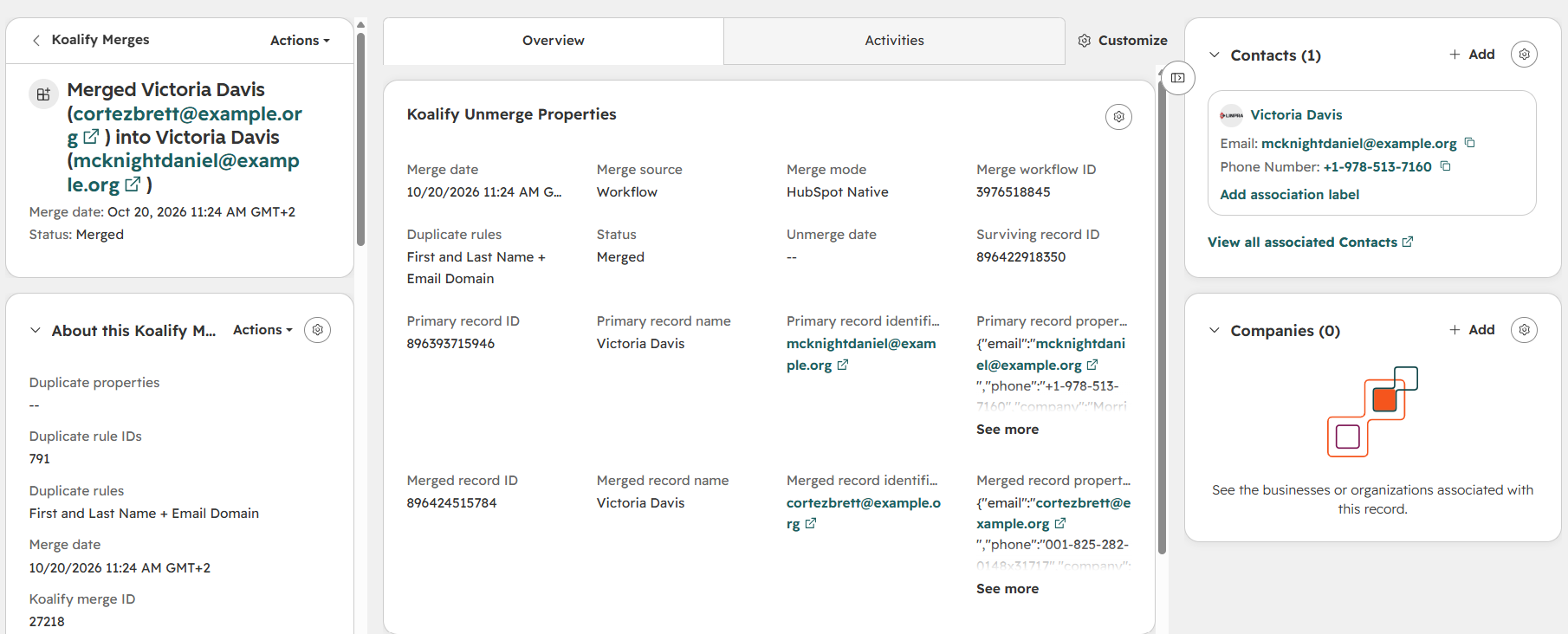
That snapshot is what lets Koalify rebuild the record that was merged away.
A few honest limits before you rely on it:
- Only merges made through Koalify can be unmerged. Merges done in HubSpot's native merge tool, or before you installed Koalify, have no snapshot to restore from.
- Unmerge currently covers contacts and companies.
- The restored record gets a new HubSpot record ID. Koalify logs it as the Restored Record ID on the Koalify Merge record. If an integration references the old ID, plan for that.
How to unmerge a single record
Use this when you spot one wrong merge, for example after a hurried click on a duplicate card.
- Open the Koalify app event in the merged record's activity timeline. Check the rule and trigger to confirm it really is a bad merge.
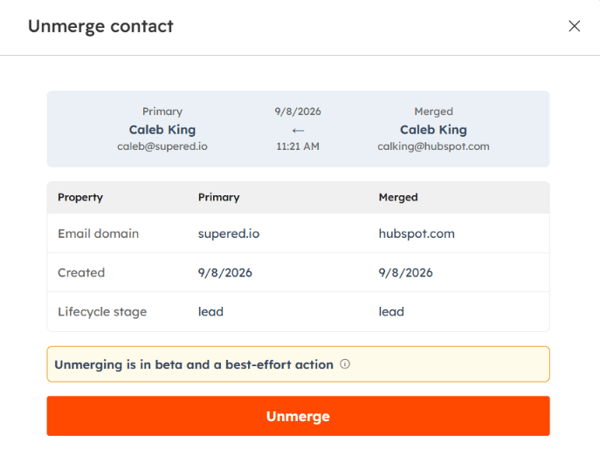
- Click Unmerge. Koalify shows you which property values will be split back across the two records.
- Confirm, and mark the pair as non-duplicates in the same step, so Koalify doesn't flag them again.
- Open the recreated record. Both records now exist separately, each with its own associations. The pair appears under rejected duplicates on the Koalify duplicate card.
How to bulk unmerge records in HubSpot
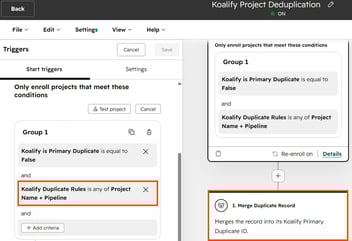
When a workflow or rule has merged the wrong records in bulk, you reverse them in bulk too. Every Koalify Merge record can be enrolled in a workflow, so you filter down to the bad merges and undo them in one go.
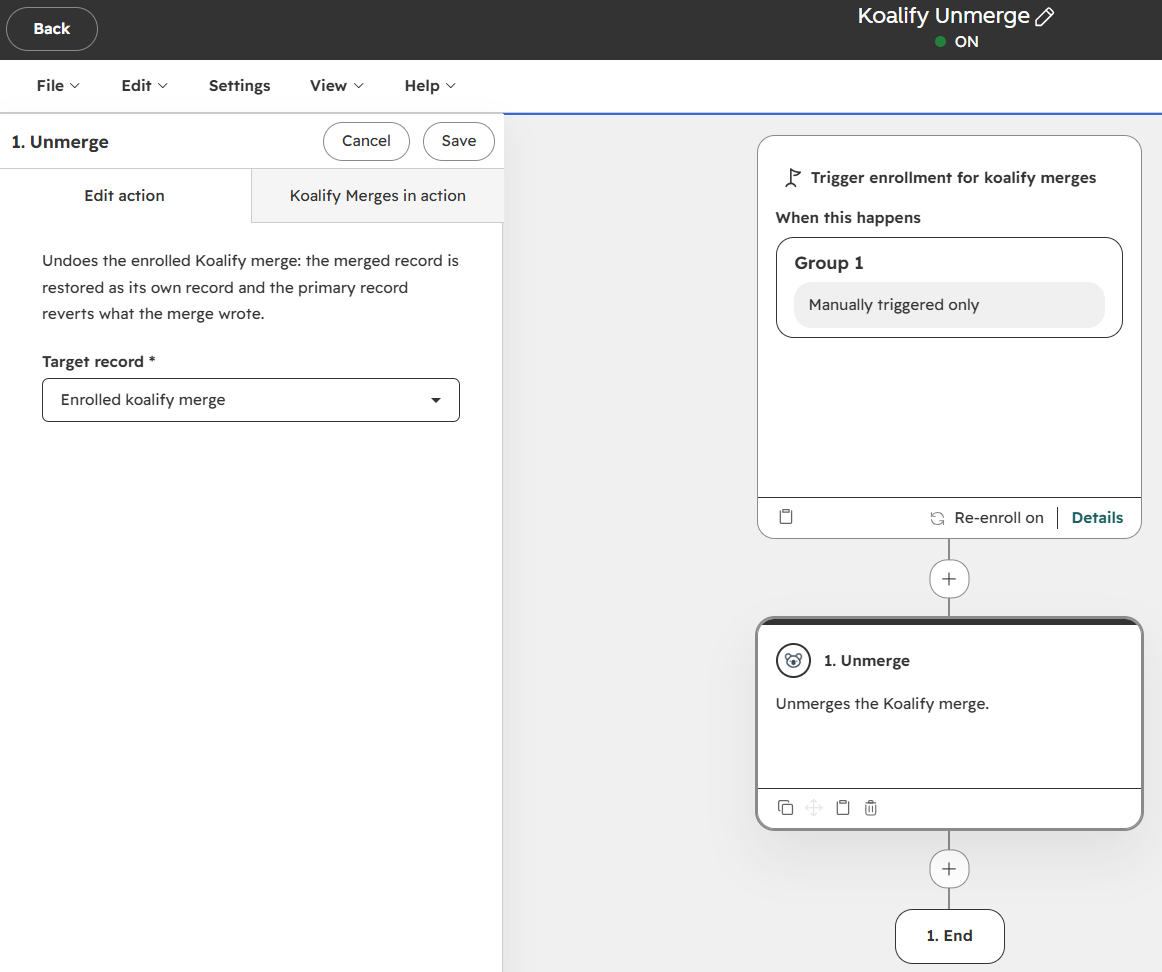
- Create an unmerge workflow (once). In Automation > Workflows, create a workflow based on Koalify Merges, set it to Trigger manually only, and add the Koalify Unmerge action. You can reuse it every time.
- Stop the cause first. Turn off the workflow that made the wrong merges, or fix the duplicate rule. Otherwise it may merge the same records again straight after you unmerge them.
- Filter the bad merges. In CRM > Koalify Merges, use advanced filters such as Merge source is Workflow, Workflow ID is the workflow that caused it, Merge date is today, and Duplicate rules is the rule at fault. Open a handful of records to confirm they were merged by mistake.
- Enrol them. Select all records in the view, click More > Enroll in workflow, and choose your unmerge workflow.
- Track progress. Add the Status column to your view. Each merge moves from Merged to Unmerging to Unmerged. If one fails, Unmerge Error tells you why.
The whole process stays inside HubSpot. There's no export, no spreadsheet and no separate tool to log into.
What to check after you unmerge
Unmerging fixes the records. These checks stop the problem coming back:
- Spot-check a few restored records. Look at associations, key properties and the timeline before you call it done.
- Fix the rule, not just the result. If a rule produced bad merges once, it will again. Tighten it, then widen it gradually once you trust it.
- Watch for deep merge chains. As a rule of thumb, one record absorbing a couple of duplicates is normal. Three to five is worth reviewing. Six or more usually points to a rule that's too loose.
- Check workflow enrolments. HubSpot unenrols records when they're merged, so restored records may need re-enrolling in nurture or routing workflows.
Unmerge is a safety net, not a rollout plan
Being able to undo a merge doesn't mean you should skip the careful steps. Test new rules on a small segment, review the first batch of merges by hand, and keep a backup before large bulk runs.
What unmerge changes is the risk of switching automation on. One customer told us he'd been "scared to just start merging". After seeing an unmerge in action, he moved straight to bulk merging his backlog. That's the point: deduplication that runs in the background, with rules you control and a way back if a rule gets it wrong.
FAQ
Can you undo a merge in HubSpot?
Not natively. HubSpot doesn't offer an unmerge feature, and merged records can't be separated again through HubSpot itself. The only native option is rebuilding the record by hand from property history. If the merge was done with Koalify, you can unmerge it from the record's timeline or in bulk with a workflow.
Can Koalify unmerge records merged in HubSpot's native merge tool?
No. Koalify can only unmerge merges it made itself, because unmerging relies on the snapshot of both records that Koalify logs at the moment of the merge. Merges done in HubSpot's own tool, or before Koalify was installed, have no snapshot to restore from.
Does unmerging restore the original record ID?
No. The record that was merged away is recreated with a new HubSpot record ID. Koalify stores that new ID as the Restored Record ID on the Koalify Merge record, so you can trace it.
Which HubSpot objects can be unmerged?
Contacts and companies.
How do I find which records were merged by mistake?
Go to CRM > Koalify Merges and filter by merge source, workflow ID, merge date or duplicate rule. Every merge Koalify makes is listed there, along with the property values of both records before the merge.
Will unmerged records be merged again?
Only if the rule or workflow that merged them is still active. Turn it off or fix the rule before you unmerge. For single unmerges, you can also mark the pair as non-duplicates so Koalify won't flag them again.
Merge thousands, with a way back
Clearing a 50,000-record backlog is far easier when you know a bad rule isn't permanent. Install Koalify free and run your first bulk cleanup with unmerge as your safety net.